
Understand Claude Code pricing — the 5-hour window, weekly caps, and Opus limits — plus how to pick the right plan mid-task? Understand Claude pricing’s 5-hour window, weekly caps, and Opus limits — plus how to pick the right plan.
If you’ve ever had Claude Code stop mid-refactor and thought “wait, I just started this week” — you’re not imagining things. Claude pricing looks simple on the
surface: pick a plan, pay monthly, start coding. But the quota system running underneath it is a lot more layered than the pricing page lets on, and it’s the reason
two people on the exact same plan can have completely different experiences.
This guide breaks down exactly how Claude Code’s usage limits work — the 5-hour window, the weekly caps (yes, there are two), and how to actually figure out
which plan fits how you work, instead of guessing based on price alone.This guide breaks down Claude Code Pricing in detail — the 5-hour window, the weekly caps (yes, there are two)…
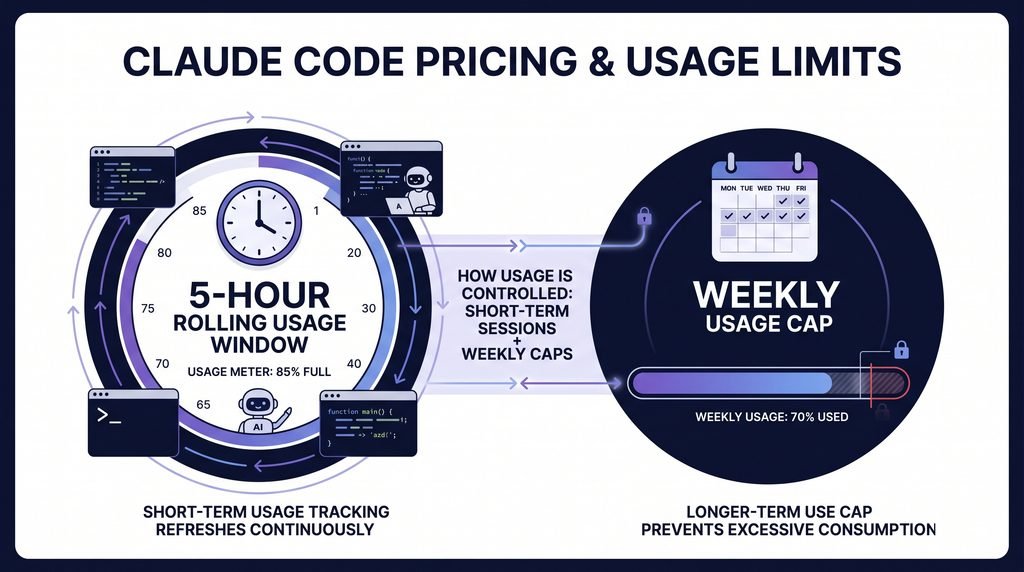
1 – Claude Code Pricing: A Quick Overview
Here’s the first thing worth knowing about Claude pricing: Claude Code doesn’t have its own separate price tag. It rides on top of one of Claude’s existing Claude
AI subscription plans — Pro, Max, Team, or Enterprise — or you can skip subscriptions entirely and pay per token through the Anthropic API.But the sticker price is only half the story when it comes to Claude Code Pricing.
One detail that trips people up constantly: the Free plan does not include Claude Code at all. If you’re on Claude’s free tier and wondering why the CLI won’t
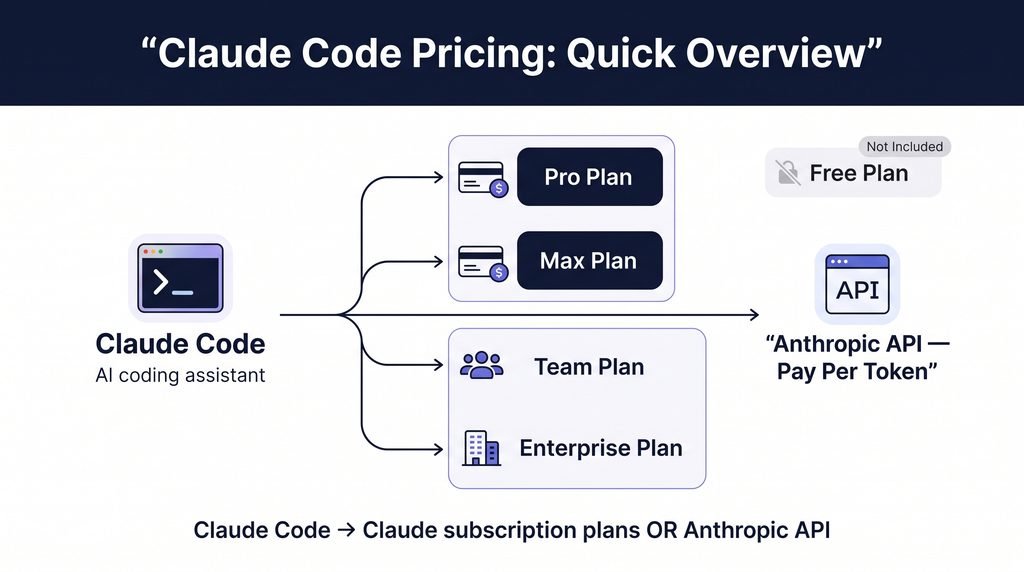
run, that’s why — you need at least a Pro subscription ($20/month) or an API key with credit on it.
But the sticker price is only half the story. Two people can both be on the Pro plan and have wildly different experiences depending on how they use it — which is
exactly what the quota system below explains. For the full breakdown of every Claude pricing plan, check our complete pricing guide.Both of these can be true at the same time with Claude Code Pricing, and it’s not a bug.
Internal link: “check our complete pricing guide” → Pillar page: Claude Pricing 2026 (All Plans Compared)
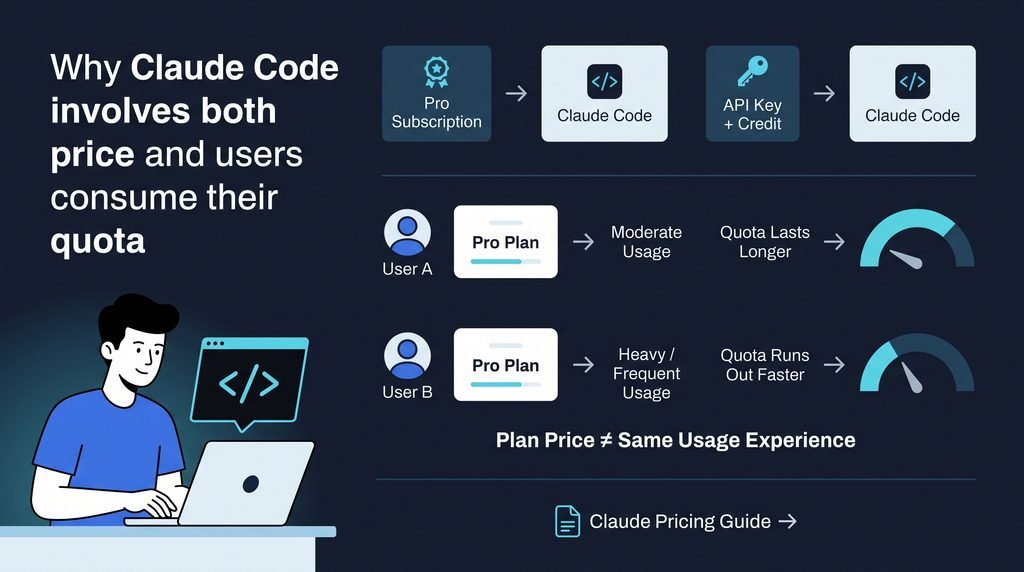
1.1-Claude Code Pricing: Why It Confuses People
Here’s a scenario that happens more often than you’d think: it’s Wednesday, you’ve barely touched Claude Code all week, and suddenly you’re told you’ve hit
your limit. Meanwhile, your coworker has been running agents non-stop since Monday and hasn’t hit a wall yet.
Both of these can be true at the same time, and it’s not a bug. Claude Code’s usage is governed by two separate layers stacked on top of each other — a short
term window and a weekly cycle — and they reset on completely different schedules.
There’s also a detail that catches people off guard: your Claude Code usage and your regular Claude chat usage draw from the same shared pool. If
you spent Tuesday afternoon in long chat conversations planning a project, that’s quota you no longer have available for coding on Wednesday. They’re not
separate buckets — it’s one account-wide allowance.
Once you understand these two layers, the “why am I blocked” mystery mostly disappears.Once you understand these two layers, the Claude Code Pricing mystery mostly disappears.
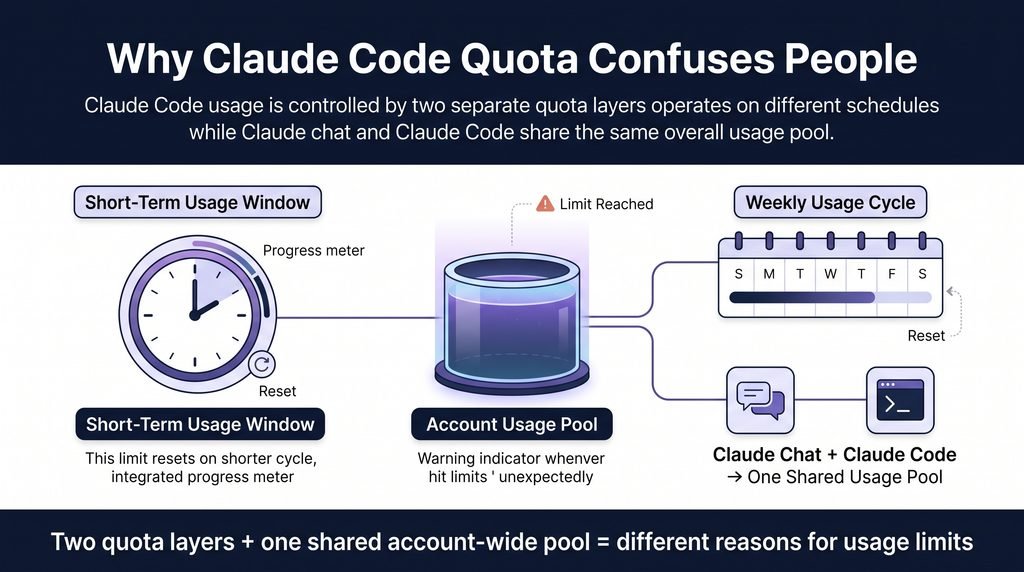
1.2-The 5-Hour Rolling Window Explained
The first layer is a rolling 5-hour window, and the “rolling” part matters. It doesn’t start at midnight or reset at a fixed clock time — it starts the moment you send
your first message, and it slides forward from there.
Here’s what that looks like in practice: say you open Claude Code at 9 AM and start an intense debugging session. By 11 AM, if you’ve been running the agent
hard — reading files, executing tools, thinking through a big refactor — you might exhaust that window even though your weekly allowance is barely dented. The
window will reset around 2 PM, five hours after you started, not at some fixed time you can plan around in advance.Here’s what Claude Code Pricing looks like in practice: say you open Claude Code at 9 AM..
This is why a single intense afternoon can hit a wall long before the week’s overall usage feels like it should be a problem. If you’re on an eligible paid plan, you
can enable usage credits to keep working past the included limit instead of just waiting out the reset — useful if you’re mid-task and can’t afford to stop.

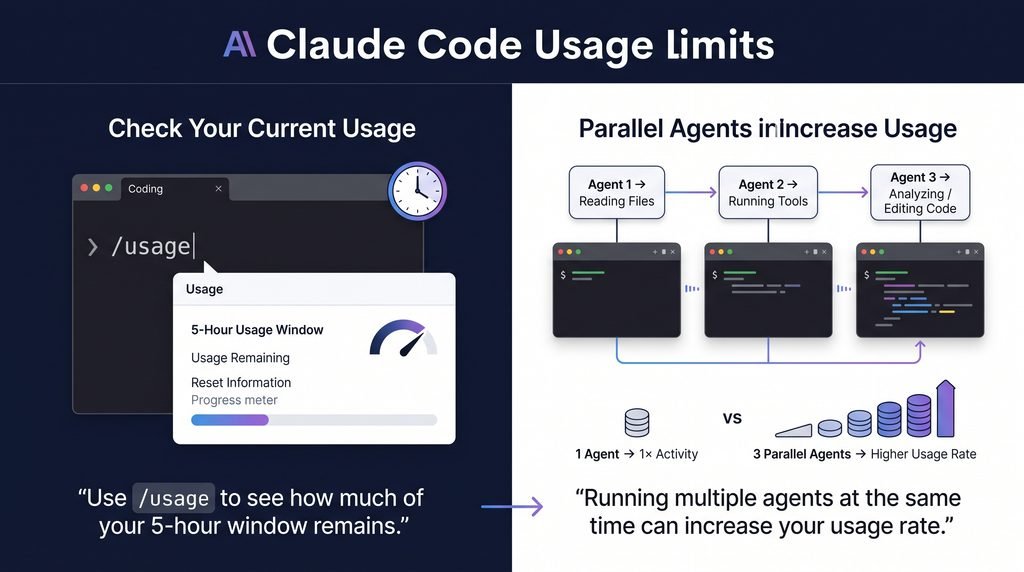
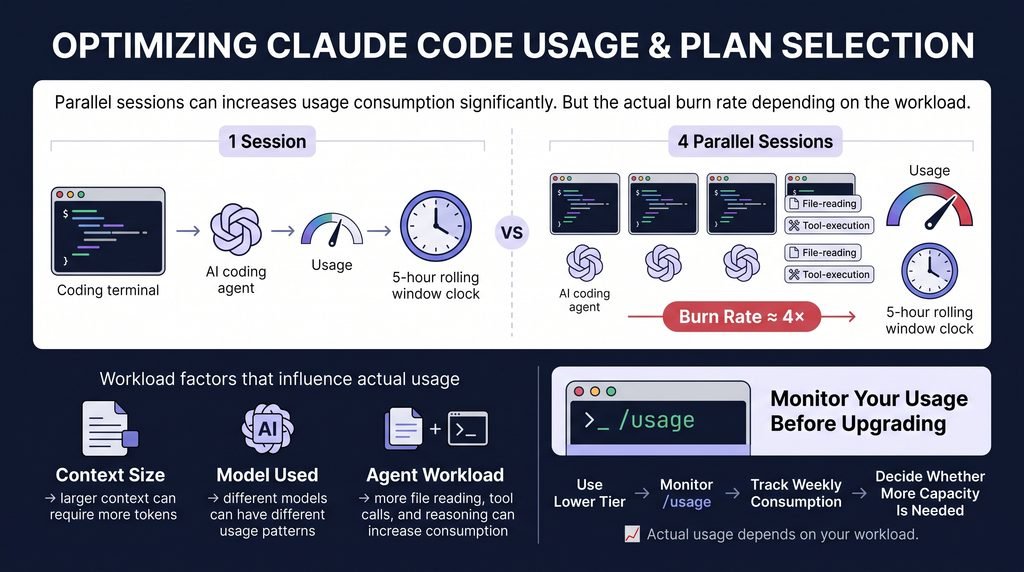
Practical tip: run /usage inside a Claude Code session at any time. It tells you exactly how much of your current 5-hour window is left, so you’re not guessing.This is one of the most overlooked parts of Claude Code Pricing — running multiple agents in parallel
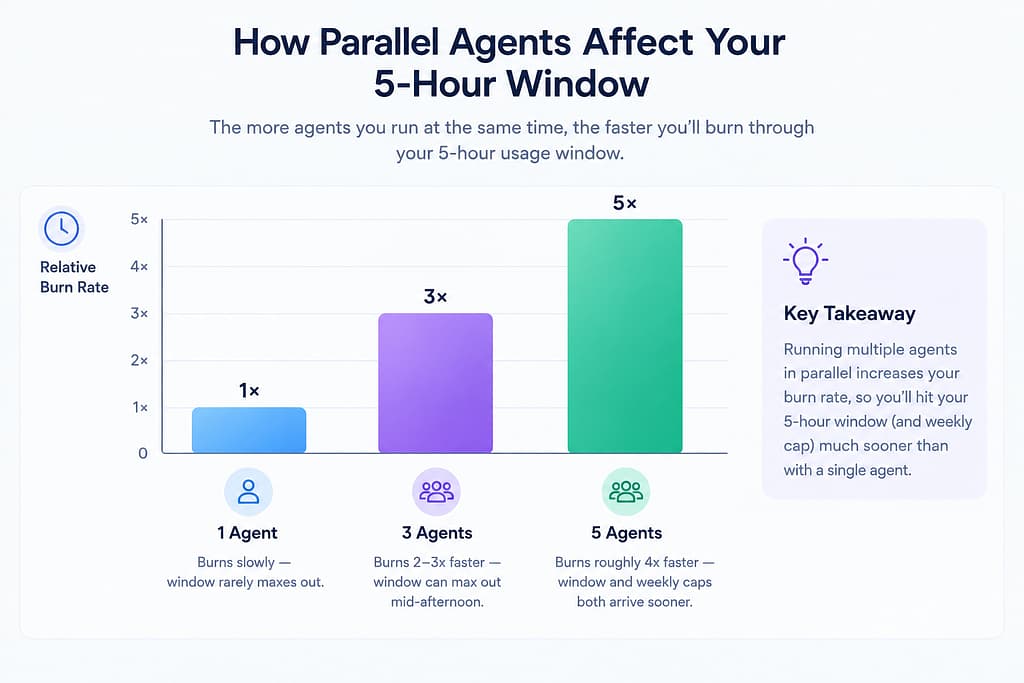
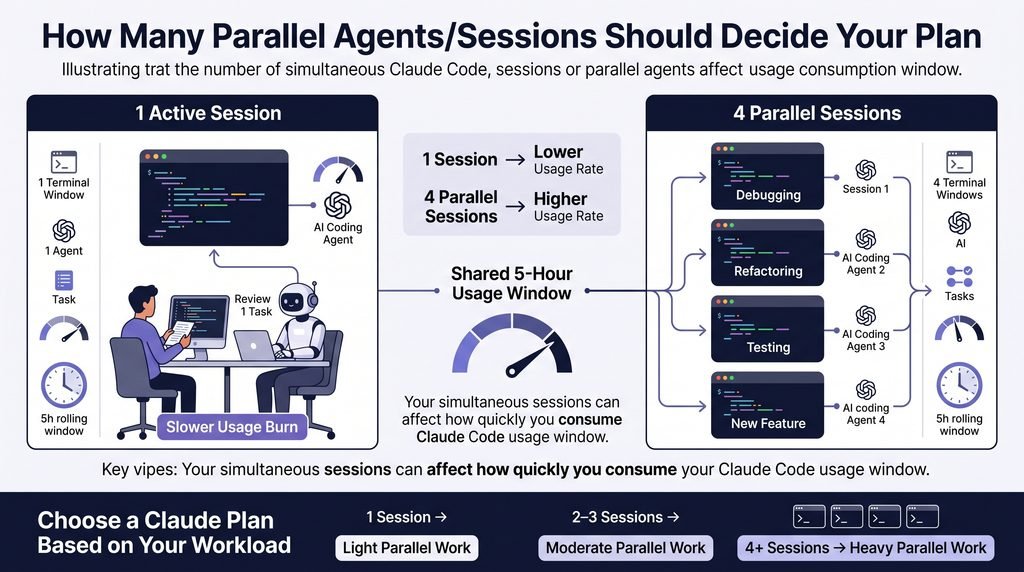
One thing that makes this window burn faster than people expect: running multiple agents in parallel. If you’ve got three terminals open working on different
parts of a project simultaneously, each one is independently reading files and burning through tokens — so your effective burn rate isn’t 1x, it’s closer to 3x.
| Session pattern | Effect on 5-hour window |
| 1 agent, active review | Burns slowly — window rarely maxes out |
| 2–3 agents in parallel | Burns 2–3x faster — window can max out mid-afternoon |
| 4+ agents in parallel | Burns roughly 4x faster — window and weekly caps both arrive sooner |
1.3-The Weekly Limits: Not One Cap, But Two
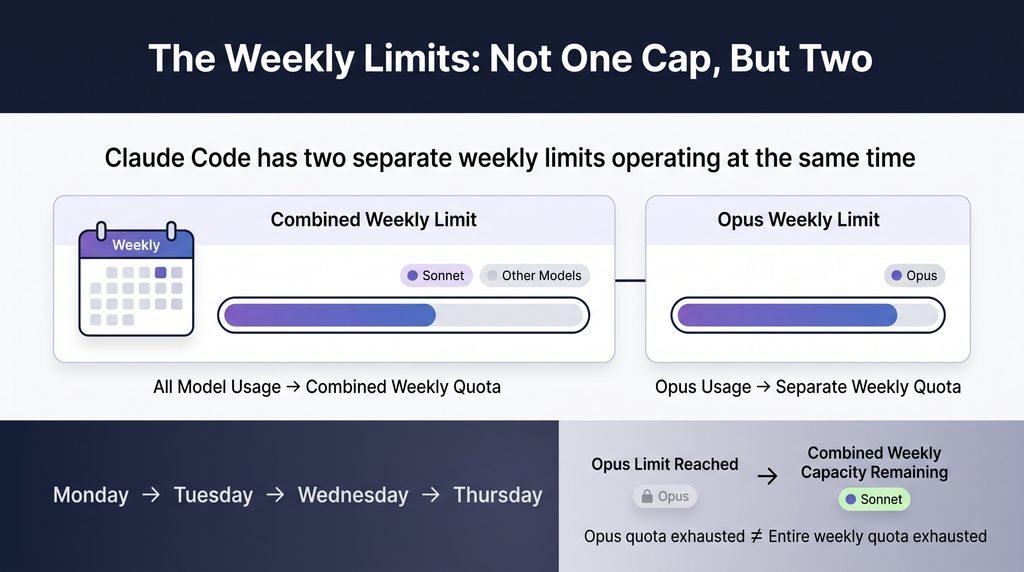
This is the part most explanations get wrong — including a lot of official-sounding summaries. It’s tempting to assume there’s one weekly quota and once you’re
out, you’re out. In reality, there are two separate weekly limits running at the same time:
1. A combined weekly limit across all models you use.
2. A separate weekly limit specifically for Opus.Here’s what that means in real terms: you can burn through your Opus allowance by Thursday running a big architecture-planning session, get locked out of Opus
specifically, and still have plenty of combined weekly quota left — because Sonnet keeps working just fine. You haven’t hit “the” limit. You’ve hit one of two, and
the other is untouched.This is the part of Claude Code Pricing most explanations get wrong
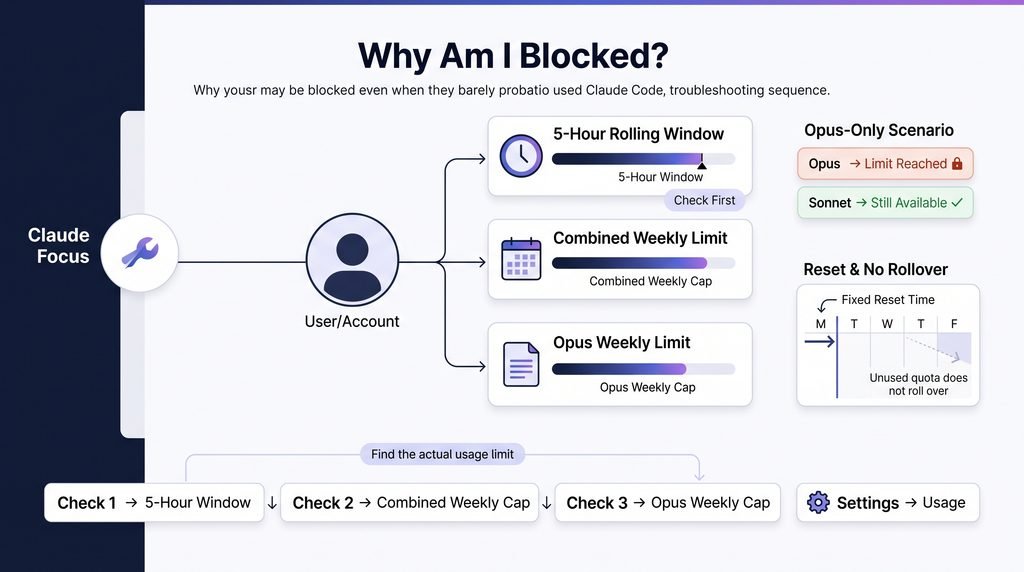
This explains a support-forum classic: someone insists they’ve “barely used it this week” while genuinely being blocked — because they’re blocked on Opus only,
and haven’t noticed Sonnet is still available to them.
Both caps reset at a fixed time tied to your account (you can check exactly when under Settings → Usage), and — this part matters — unused quota does not
roll over. A quiet week doesn’t bank you extra room for a busy one.
If you ever hit a wall and aren’t sure why, the troubleshooting order is simple: check the 5-hour window first, then the combined weekly cap, then the Opus
specific weekly cap. One of those three is almost always the actual culprit.Both caps reset on a schedule, which is a key part of how Claude Code Pricing actually works week to week
2 – Claude Code Pricing: How Many Sessions Should Decide Your Plan
Most people shop for Claude Pro pricing by asking “do I code enough to justify $100 a month?” That’s the wrong question. The real deciding factor isn’t how
many hours you work — it’s how many sessions you run at the same time.
Think about it this way: one terminal, where you’re driving the agent and reviewing its output as it goes, sips from your 5-hour window slowly. Four terminals
running in parallel on four different tasks each pull from that same window independently — so you hit the ceiling roughly four times faster, even if your actual
“working hours” haven’t changed at all.
Here’s a rough guide based on that:
| Sessions running at once | Plan that usually fits | Why |
| 1 session | Pro ($20/month) | Sized for one agent you’re actively driving and reviewing |
| 2–3 sessions | Max 5x (from $100/month) | Multiple agents drain the same window 2–3x faster |
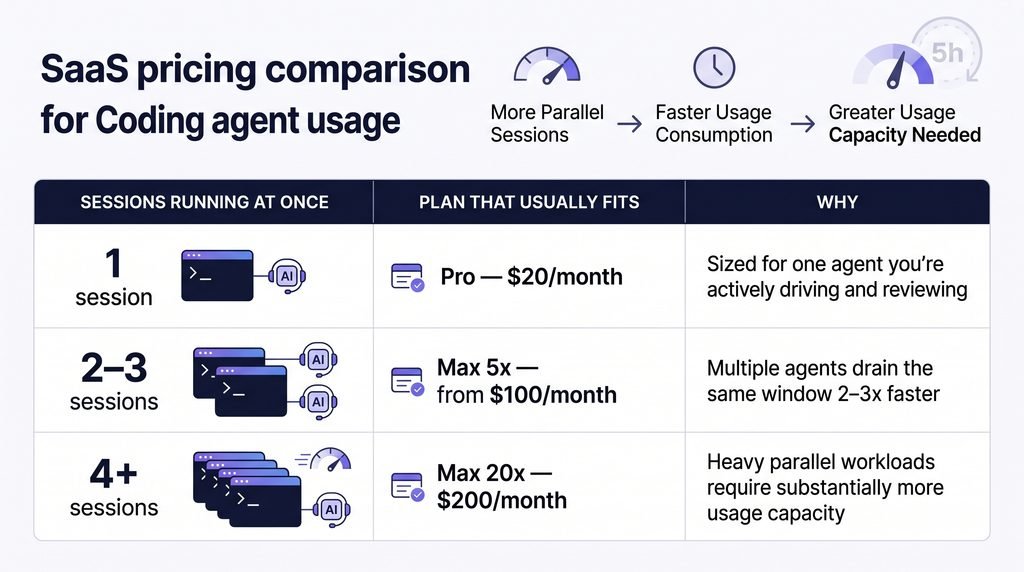
Burn rate roughly quadruples, and weekly caps arrive sooner too
Treat this as a starting point, not a promise — actual burn depends on your context size, which model you’re using, and how much the agent has to read before it
does anything. The only real way to know is to spend a week on the cheaper tier with /usage open and see if you finish the week without hitting a wall. If you
do, you’ve saved yourself a $80/month upgrade you didn’t need.
Want the full side-by-side on what each tier actually gets you? Compare Pro, Max 5x, and Max 20x here. And if you’re buying for a team instead of yourself, our
Claude AI subscription plans guide covers Team and Enterprise pricing in detail.
Internal link 1: “Compare Pro, Max 5x, and Max 20x here” → Claude Pro vs Max 5x vs Max 20x article
Internal link 2: “Claude AI subscription plans guide” → Team & Enterprise Pricing article

3 – Claude Code Pricing vs the Anthropic API: Subscription or Pay-Per-Token
There’s a second path that a lot of people don’t realize exists: skip the subscription model entirely and bill per token through the Anthropic API. No monthly fee,
no 5-hour window, no weekly wall — you just pay for what you use.
As of the current published rates, the headline per-million-token pricing looks like this (always worth double-checking on Anthropic’s own pricing page, since these
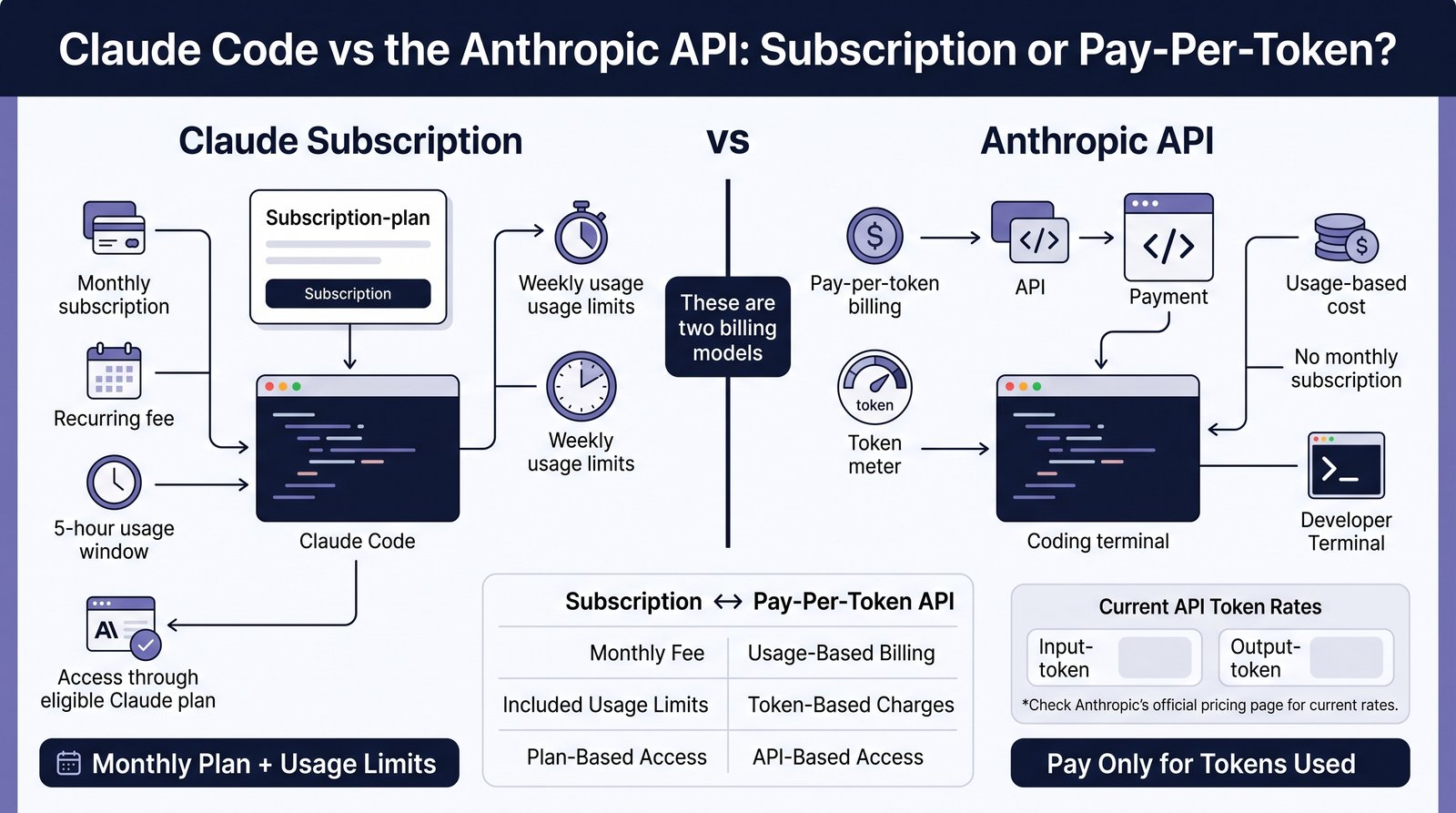
do shift):
| Model | Input | Output |
| Claude Opus 5 | $5.00 | $25.00 |
| Claude Sonnet 5 | $2.00 | $10.00 |
| Claude Haiku 4.5 | $1.00 | $5.00 |
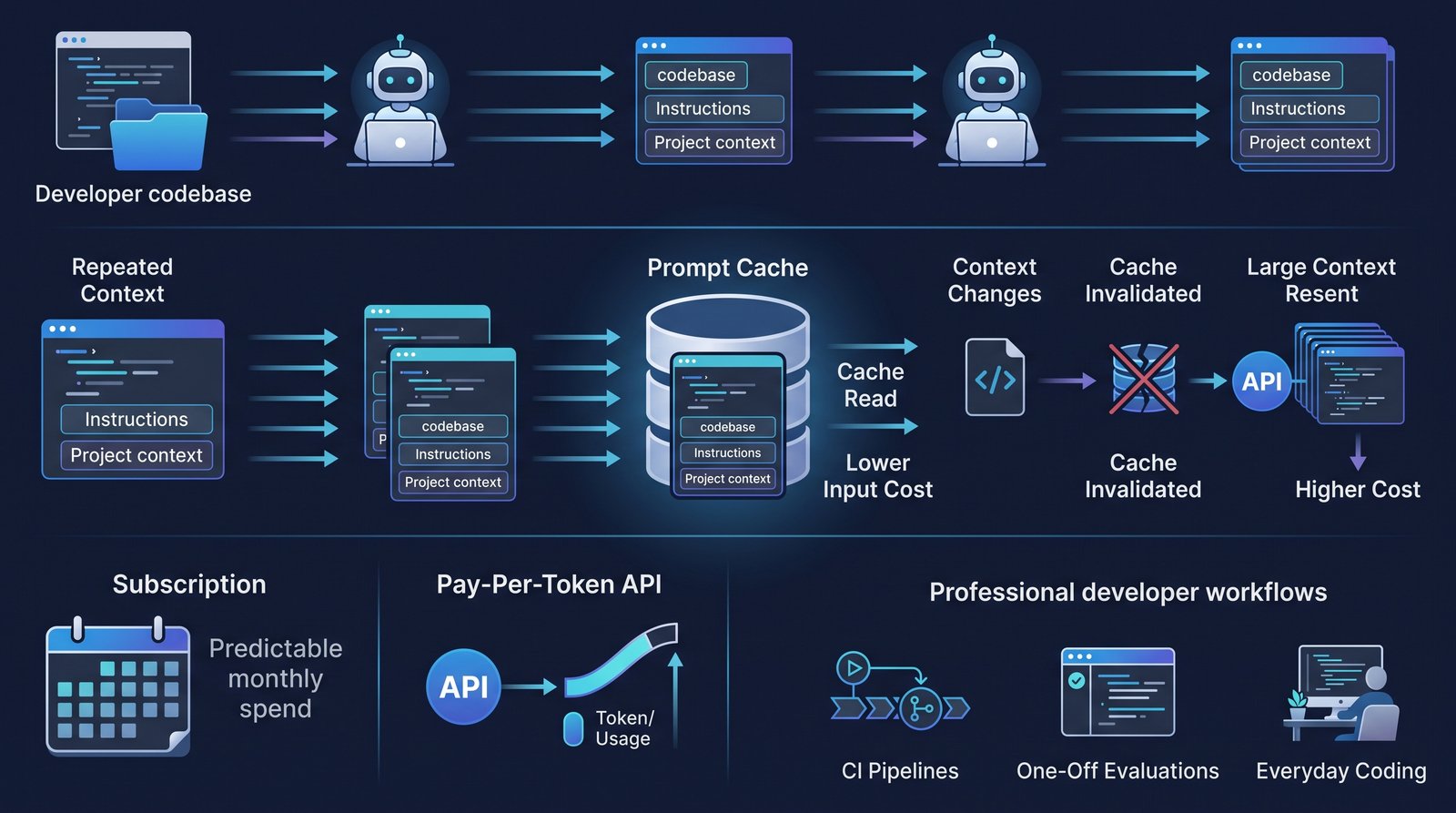
The number that actually decides whether this route is cheap or painful is prompt caching. Cache reads cost roughly a tenth of the standard input price, and
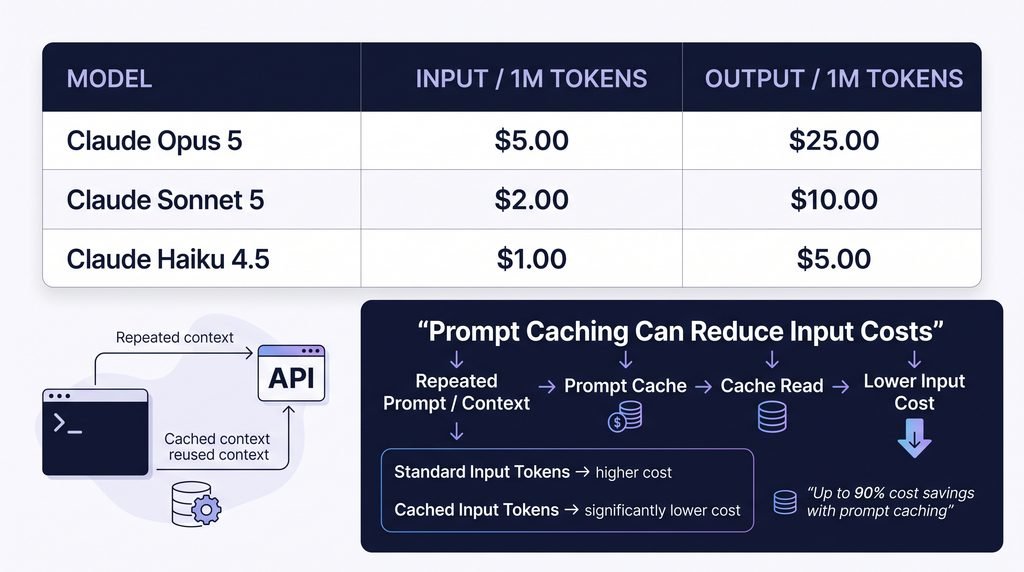
coding agents are almost perfectly suited to this — they resend a large, mostly unchanged context (your codebase, your instructions) on nearly every turn. An
agent session that leans on caching well can end up surprisingly affordable. One that keeps invalidating its own cache — say, by constantly changing large parts
of the context — loses that advantage fast.
The honest trade-off: metered billing removes the wall, but it also removes the safety net. A subscription caps your worst-case spend at a known monthly
number. A misbehaving agent on a pay-per-token setup can quietly run up a bill you didn’t see coming. This is why the API route tends to make more sense for
bursty, bounded work — CI pipelines, one-off evaluation runs — rather than as your everyday driver.
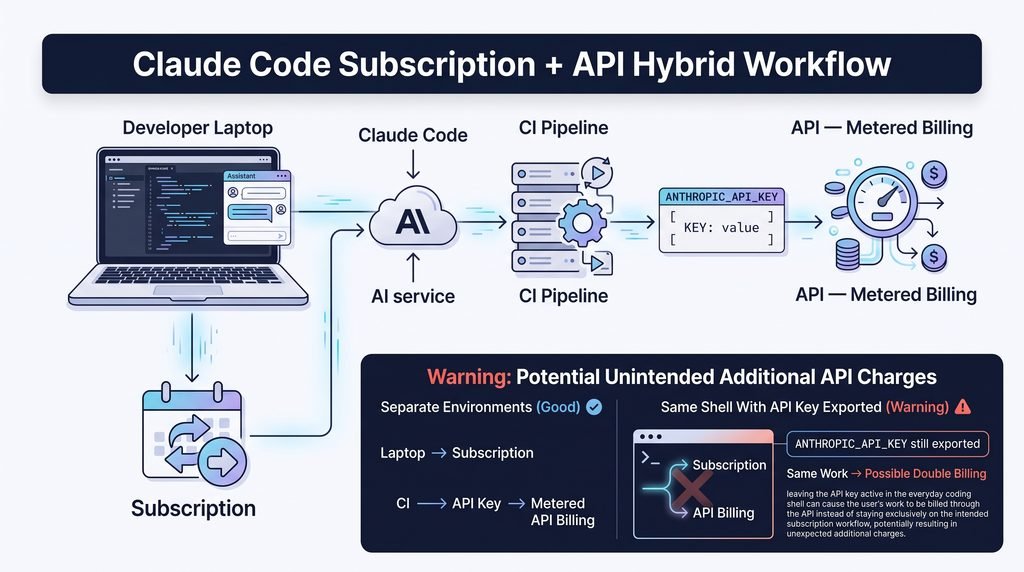
You’re also not locked into picking one path exclusively. Claude Code reads the ANTHROPIC_API_KEY environment variable when it’s set, which means you can
run your CI jobs on metered API billing while your laptop keeps using your subscription. Just one word of caution here: if that variable stays exported in the same
shell you’re coding in day-to-day, you’ll end up billed twice — once through your subscription, once through the API — for the same work.
For the complete token-pricing breakdown across all models, see our full Claude API pricing guide. And if you’re still comparison-shopping, it’s worth seeing how
Claude pricing compares to ChatGPT and Gemini before you commit.
Internal link 1: “full Claude API pricing guide” → Claude API Pricing Explained article
Internal link 2: “Claude pricing compares to ChatGPT and Gemini” → Claude vs ChatGPT vs Gemini Pricing article

4 – Tracking Claude Code Pricing and Usage in Real Time
The single most useful habit here is running /usage inside any Claude Code session. It shows you exactly where you stand against your 5-hour window and both
weekly caps, in real time — no guessing required.Beyond that, Settings → Usage in your Claude account shows you exactly when your weekly limits reset, which is worth checking once so you know your personal
schedule rather than assuming it lines up with a calendar week.
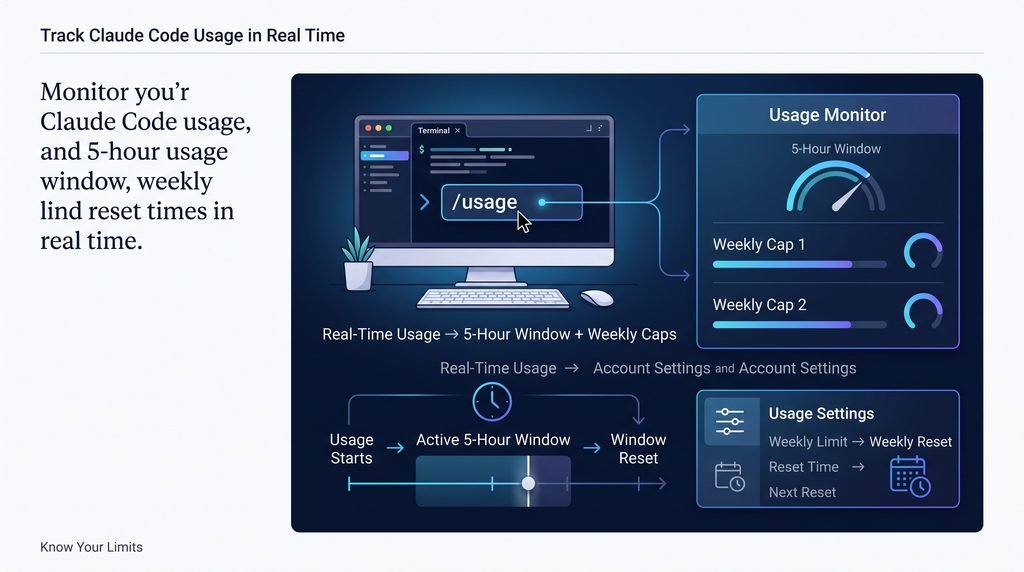
If you’re regularly running several parallel agents and want a bird’s-eye view instead of checking /usage manually each time, there are third-party desktop tools
built specifically to surface this — showing your quota alongside whatever else you’re running, so you see the wall coming before an agent stalls mid-task rather
than after.

Final Thoughts
- Restate the key takeaway: start with one or two free tools and test them on a real project.
- Include the keyword naturally once.
- End with a soft call to action, such as reading the beginner’s guide or the comparison article.
Frequently Asked Questions
1-Is Claude Code free?
No. The Free Claude plan doesn’t include Claude Code at all — you need at least a Pro subscription ($20/month) or an API key with credit.
2-What happens when I hit the 5-hour limit?
You either wait for the rolling window to reset (five hours after your first message in that window) or, on eligible paid plans, enable usage credits to keep going
past the included limit.
3-Why am I blocked on Opus but Sonnet still works?
Because the weekly cap isn’t one limit — it’s two. You’ve likely exhausted the Opus-specific weekly allowance while your combined weekly quota (which Sonnet
draws from too) still has room.
4-Does unused Claude Code quota roll over?
No. Both the 5-hour window and the weekly caps reset on their own schedule regardless of how much you left unused.
5-Can I switch between subscription and API billing?
Yes — Claude Code will use an API key if ANTHROPIC_API_KEY is set in your environment, letting you mix subscription usage on your main machine with metered
billing for things like CI. Just make sure the variable isn’t left exported where you don’t want it.

Pingback: GitHub Copilot Pricing 2026: Best Plan for Every Developer -