
Create QR code free in minutes. Learn which free QR codes never expire, how to get free scan tracking, and the best AI tools for 2026.
Picture a café owner in Manchester who prints 500 table cards with a QR code for the menu. Three weeks later, scans start landing on a “Your trial has ended” page. The cards are printed and the money is spent.
This happens more often than you’d think, and it’s why “free” needs a closer look. If you want to create QR code free and have it keep working, you need to know which free codes expire, which include tracking, and which tools are worth your time.
This guide covers all of that. By the end, you’ll know how to create QR code free in about two minutes, avoid the traps, and pick the right tool for your situation.

1- “Create QR Code Free” Really Mean
Almost every tool that lets you create QR code free says “free.” They don’t all mean the same thing, and the difference decides whether your code is still working in six months.
1.1-Truly Free vs Free Trial vs Free With Limits
- Truly free: a permanent free plan with no time limit. The code works until you delete it.
- Free trial: full features for a short period (14 days is common), then the dynamic codes you made may stop working or get locked.
- Free with limits: the plan is permanent, but capped, for example a set number of codes or a maximum number of scans per month.
Some tools present a short trial as if it were a free plan, so always read the pricing page before you create QR code free and send anything to print.

1.2-What You Can and Can’t Get for Free
| Feature | Usually free? | What to watch for |
|---|---|---|
| Static QR codes | Yes | Rarely any catch; they don’t expire |
| Dynamic (editable) QR codes | Sometimes | Often limited to 2-10 codes, or tied to your plan |
| Scan analytics | Sometimes | Often locked to paid tiers |
| Logo and custom colors | Usually | Some tools add their own branding |
| High-res or SVG download | Varies | Print-quality files are sometimes paywalled |
2- Static vs Dynamic QR Codes: Why Some Free QR Codes Expire
This is the part most guides skip, and it’s the one that saves you money when you create QR code free and print it.
2.1-How Static QR Codes Work
A static code stores your information directly in the pattern of squares. A URL, a block of text, or your WiFi password is baked into the image itself.
Because nothing runs through a company’s server, a static code cannot expire. It also can’t be edited or tracked. If your link changes, you reprint.
Static is the right choice when you create QR code free for:
- WiFi login details
- Plain text, like a short message
- A permanent link, like your website’s homepage
2.2-How Dynamic QR Codes Work
A dynamic code stores a short redirect link instead of your final destination. When someone scans it, they pass through the platform’s server first, then land on your page.
That extra step gives you two big benefits: you can change the destination later without reprinting, and the platform can count scans. A restaurant, for example, can swap a summer menu for an autumn one while the printed table cards stay exactly the same.
The catch is that the code depends on the platform. If your plan lapses or the trial ends, the redirect can stop working, and so does everything you printed.
2.3-Create QR Code Free: Static Codes That Never Expire
It varies by tool, which is why checking matters before you create QR code free for anything permanent. Based on what each provider publishes (confirm current terms before you commit):
- Static codes from any reputable tool don’t expire.
- Dynamic codes on some platforms stay active only while your plan is active. QR Tiger, for example, states that its dynamic codes stop working once the plan expires.
- A few tools offer free dynamic codes with no expiry date. The QR Code Generator (TQRCG) says its 2 free dynamic codes never expire.
Ask these five questions before you print:
- Is this a static or a dynamic code?
- If dynamic, does it expire when a trial or plan ends?
- Is there a scan limit, and what happens when I hit it?
- Can I download the file in a print-ready format?
- Will I need an account to keep editing it?

4- How to Create a QR Code Free: Step-by-Step
Any free online QR code generator follows roughly the same flow to create QR code free. Here’s the process, with the decisions that matter at each step.
4.1-Step 1: Choose Your QR Code Type
Decide what the code should do before you touch the design. The common types:
- URL: sends people to a website, booking page, or product page
- vCard: saves your contact details straight to someone’s phone
- WiFi: connects guests to your network without typing a password
- PDF: opens a menu, brochure, or price list
- Social media: takes people to your Instagram, TikTok, LinkedIn, or YouTube page
- Text: shows a short message
The type matters because it determines how much data goes into the code. More data means a denser, harder-to-scan pattern.
4.2-Step 2: Enter Your Content
Paste your link or details. When you create QR code free, this is where typos creep in, so check them twice. A typo in a URL means a perfectly designed code that goes nowhere, and you won’t find out until after the print run.
If you’re sending people to a long link, use a clean landing page URL instead of a messy one with dozens of tracking parameters. Shorter content makes a simpler, more reliable code.
4.3-Step 3: Customize Colors, Logo and Frame
A good free QR code maker lets you change the colors, add a logo, pick a dot style, and wrap the code in a frame with a call to action. If you want to create QR code free that still looks professional, follow the rules in the design section below, because this is where most scan failures start.
4.3-Step 4: Test, Download and Use
Before you download the final file:
- Scan it with at least one iPhone and one Android phone.
- Test it at the size it will actually be printed. A code that scans fine on your monitor can fail when shrunk onto a business card.
For the file format, use PNG for websites, emails, and social posts, and SVG for print. SVG is a vector format, so it stays sharp whether it’s on a business card or a shop window.

5- Best AI Tools to Create QR Code Free in 2026
“AI QR code generator” gets used loosely, so let’s separate two very different things. (A QR code is a 2D barcode, which is why a QR barcode generator and a QR code generator are often the same tool.)
5.1-What “AI QR Code Generator” Actually Means
Type 1: AI-assisted tools. These are standard QR platforms that use AI for smart suggestions, design help, or routing. They produce normal, reliable codes.
Type 2: AI-art QR codes. These blend an image, like a landscape or a product shot, into the QR pattern. They look striking, but the artistic distortion can make them fail on some phones. If you use one, test it on several devices, and don’t use it for anything you’re printing in bulk.
For most people making a code for a menu, a business card, or a flyer, Type 1 is the safer route when you create QR code free for anything you plan to print.

5.2-Comparison Table of Free QR Code Tools
Details below come from each provider’s published information. Plans change often, so verify before publishing.
| Tool | Free dynamic codes | Free analytics | Expiry risk | Best for |
|---|---|---|---|---|
| TQRCG | 2 (stated as never expiring) | Yes | Low on the free plan | Free dynamic codes you won’t have to replace |
| QRCodeChimp | 10, with 1,000 scans per month | On paid plans | Capped by scan limit | Design-heavy codes and digital business cards |
| QR Tiger | 3, capped at 500 scans each | Basic only | Dynamic codes stop when the plan ends | Marketers who want targeting features |
| Canva | Yes, with a Canva logo | Business plan and above | Depends on plan | QR codes inside designs you already make in Canva |
| QRCode Monkey | None (static only) | No | None | Custom static codes for print, including commercial use |
| Adobe Express | None (static only) | No | None | Quick static codes if you already use Adobe |
5.3-Which Tool Should You Choose?
- You printed (or will print) something permanent and may need to change the link: choose a tool with free dynamic codes that don’t expire.
- You just need a fixed link and want it to look great: a static, design-focused tool is plenty to create QR code free for print.
- You already design in Canva: use its built-in generator and keep everything in one place.
- You need to track scans without paying: pick a tool that includes analytics on its free tier, and check the limits first.
Hattrick Web Works also offers a free generator that handles WiFi codes with logo and color options, and it says it processes your data on your own device. That’s useful when the code contains a password.

6- Add Free Scan Tracking When You Create a QR Code Free
If you’ve printed something and want to know whether anyone is scanning it, you need tracking, and the best time to set it up is when you create QR code free, not after printing. Without it, you’re guessing.
6.1- What Scan Analytics Can Tell You
- Total scans vs unique scans: total shows overall activity, unique shows how many different people actually engaged
- Location: useful if you’re running the same code in several shops or cities
- Device type: iPhone vs Android, which helps if your landing page needs to work on both
- Time of day: shows when people scan
6.2-Free Tracking Options
Option 1: Use a platform with built-in free analytics. Some tools include scan data on the free plan, others lock it behind a paid tier. Check before you sign up to create QR code free with tracking.
Option 2: Add a UTM tag to your link. This works even with a static code. Add a UTM parameter to your URL (for example, ?utm_source=flyer&utm_medium=qr&utm_campaign=autumn_menu), then check the results in Google Analytics. You won’t get per-scan device data, but you’ll see how many visits came from that code.
6.3-How to Use Scan Data to Improve Results
Say you run a small gym and put the same code on a window poster and on flyers handed out at the door. Tracking shows 80% of scans come from the poster, mostly between 5 and 7 pm. Now you know where to spend your printing budget and when to promote evening class offers.
Even a small amount of data like this changes decisions. A call to action that says “Scan for a free trial class” can be tested against “Scan to see the timetable,” and the numbers will tell you which wins.

7- Professional Design Tips for Your Free QR Code
A plain black-and-white code works, and it is what you get by default when you create QR code free. But on a crowded menu, flyer, or label, a branded code looks more trustworthy, and people are more willing to scan something that clearly belongs to a real business.
7.1-Add Your Logo Without Breaking the Scan
Most generators place your logo in the center. This works because QR codes include built-in error correction. At the highest level (Level H), a code can still be read even if up to about 30% of it is covered or damaged.
Practical rules:
- Keep the logo small. A large logo covers real data and can stop the scan.
- Use a simple icon, not a full wordmark with thin text. Fine detail turns to mush at QR size.
- Choose Level H error correction whenever you add a logo.
7.2-Choose Colors With Strong Contrast
Dark pattern, light background. A deep blue on white works well. Light yellow on white doesn’t, especially in a dim restaurant. Avoid inverted codes (light pattern on dark background) unless you’ve tested them, because some scanner apps struggle with them.
7.3-Add a Call-to-Action Frame
A bare code gives people no reason to scan it. A frame with a short instruction like “Scan to see the menu” or “Scan to book” tells them exactly what happens next, and branded frames with clear instructions generally get more scans than codes with no context.
7.4-Print Size and Placement Tips
- Minimum size: about 2 × 2 cm (0.8 in). Go bigger for anything viewed from a distance.
- Quiet space: leave blank margin around the code so scanners can find it.
- Surface: matte paper beats glossy, which causes glare.
- Placement: eye level, away from windows and reflections.

8-Smart Ways to Use a Free QR Code
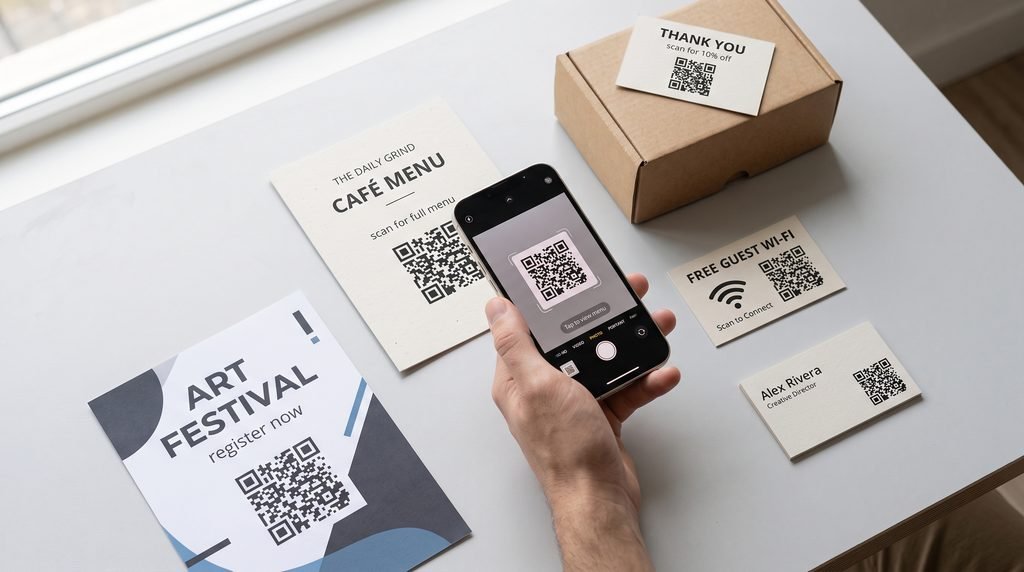
8.1-Restaurant and Café Menus
Link to a PDF or web page menu. A dynamic code lets you update prices and specials without reprinting the table cards. If you’re on a tight budget and your menu rarely changes, a static code to a hosted menu page is enough if you create QR code free for a small venue.
8.2-Business Cards and vCards
A vCard code saves your name, number, email, and website to someone’s contacts in one scan. Freelancers and consultants who create QR code free vCards like this because it replaces the “I’ll add you later” problem at networking events.
8.3-WiFi Sharing for Guests and Rentals
A WiFi code stores your network name, password, and security type. Guests scan it and join, with no typing. For an Airbnb, put it in the welcome folder. For a café, print it on table cards. Use a guest network, not your main one, because anyone who scans the code can read the password.
8.4-Product Packaging and Online Shop Orders
An Etsy or Shopify seller can put a QR code on a thank-you card that links to care instructions, a review page, or a discount for the next order. A dynamic code here is smart, since you can change the offer without reprinting thousands of cards.
8.5-Events, Flyers and Limited-Time Offers
For a flash sale or a ticketed event, dynamic codes can be set to expire on a certain date or after a set number of scans, then redirect to a “Sale ended” page or a newsletter signup. That avoids sending people to a dead link. Some platforms, like ME-QR, offer this as a built-in feature.
9- Create QR Code Free Online: Safety Checklist
Mostly yes. It is safe to create QR code free online if you pick sensible tools and know the risks.
9.1-Privacy: What Happens to Your Data
Some QR code generators process everything in your browser, so what you type never leaves your device. Others send it to a server first. That matters most for WiFi codes, which contain your password in plain form, and for anything with personal details. If you’re in the UK or EU, check whether the provider states GDPR compliance.
9.2-Quishing (QR Phishing) and How to Avoid It
Quishing is when scammers use QR codes to send people to fake login or payment pages. A common version is a sticker placed over a genuine code on a parking meter or poster.
To protect your customers:
- Use a branded code with a clear call to action, so people recognize it’s yours.
- Check printed materials in public places to make sure nobody has stuck something over them.
- Send people to a page on your own domain so they can see where they’re going.
To protect yourself as a scanner, look at the link preview your phone shows before you tap, and be wary of codes that ask for payment or login details right away.
9.3-Safety Checklist for Creators
- Use a guest network for WiFi codes.
- Don’t put sensitive data in a static code. Anyone can read it.
- Choose a reputable platform with clear terms and a privacy policy.
- Re-test your codes now and then, especially dynamic ones.

10-Common Mistakes When You Create a QR Code Free
- Low contrast. The most common cause of scan failures.
- Printing too small. Below roughly 1 inch (2.5 cm), fine detail gets lost.
- An oversized logo. Covering too much of the pattern kills the scan.
- Skipping testing. A single unscannable print batch is expensive.
- Using static for content that changes. Menus, offers, and event pages all change eventually.
- Not checking expiry terms. This is the café owner’s mistake from the start of this guide.
- No call to action. People won’t scan something that doesn’t tell them why.
- Linking to a page that isn’t mobile-friendly. Most scans happen on phones.

Conclusion: Create QR Code Free and Start Today
To create QR code free that actually serves you, the free part is easy. The hard part is choosing the right type: static if the destination will never change, dynamic if it might, and a tool whose free plan won’t quietly expire on you.
Before you print, check the expiry terms, test on two phones, and give people a reason to scan with a clear call to action. To create QR code free the smart way, start by trying a free online QR code generator with a free plan that fits your needs, make one test code, and scan it. That takes two minutes and will tell you more than any comparison table
Frequently Asked Questions
1-Can I really create a QR code free without signing up? Yes, for static codes. Several tools let you create QR code free and download it without an account. Dynamic codes and analytics usually require registration.
2-Do free QR codes expire? Static codes never expire. Dynamic codes depend on the platform: some stop working when a trial or plan ends, while a few offer free ones with no expiry. Check the provider’s terms.
3-What’s the difference between static and dynamic QR codes? A static code has your data built into it and can’t be changed. A dynamic code points to a redirect link you control, so you can edit the destination and track scans.
4-Can I track scans for free? Sometimes. A few platforms include basic analytics on their free plan. For a static code, you can add a UTM tag to the URL and use Google Analytics.
5-Can I add a logo to a free QR code? Yes, most free generators allow it. Keep the logo small and use high error correction.
