
Choosing a business intelligence platform starts with understanding your business data, goals, and reporting needs. You need to know where your data comes from, how it will be prepared and analyzed, and what dashboards or reports your team needs.
Most BI platforms promise faster insights, easy dashboards, AI-powered analytics, and better decisions. But those features only matter if the software works well with your data and your team can use it effectively.
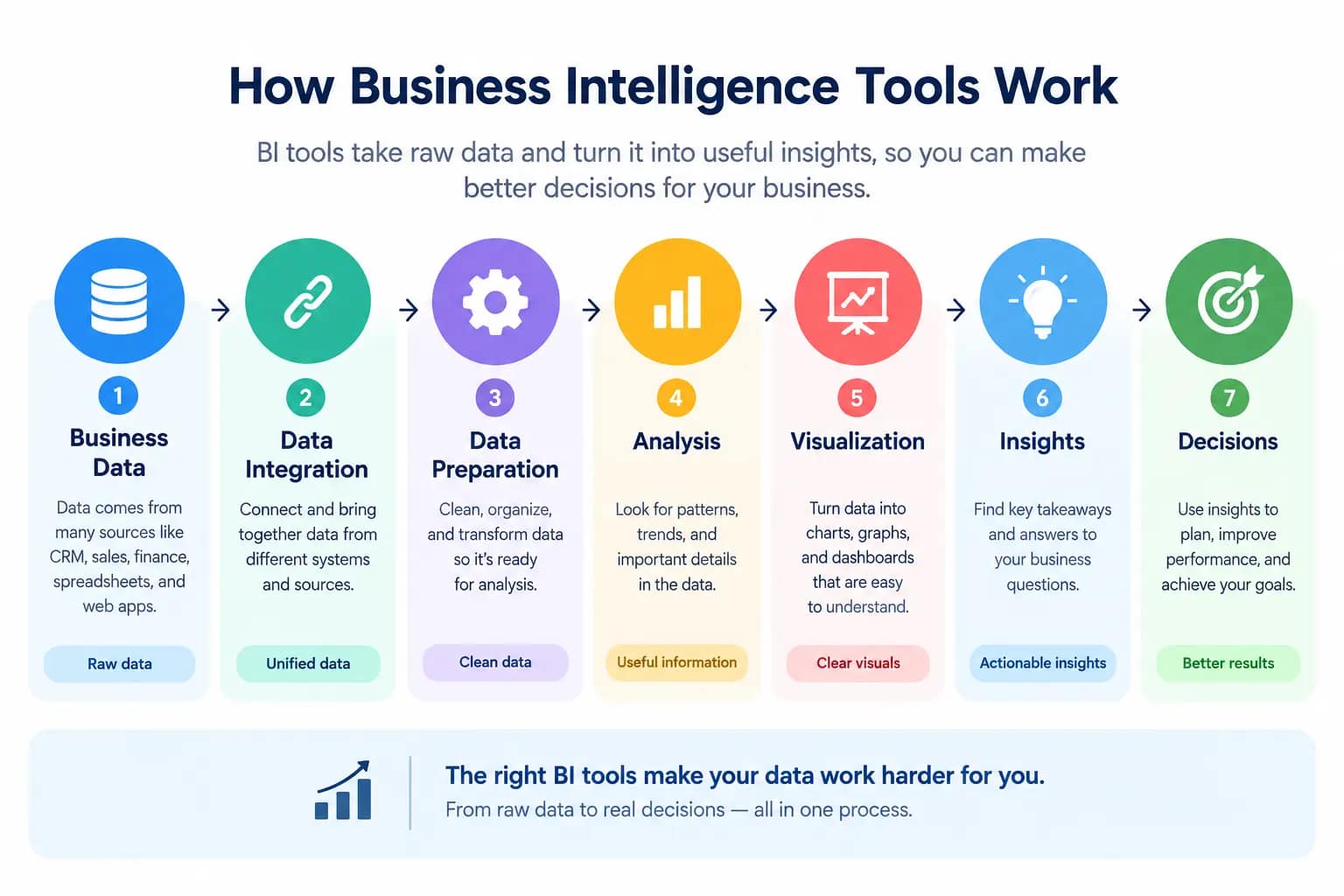
A simple way to understand BI software is to follow the process:
Business data → Data integration → Data preparation → Analysis → Visualization → Insights → Decisions
This guide explains how BI software works, where businesses use it, which features matter, and how to compare platforms based on data integration, ease of use, AI, security, scalability, and cost.
What Are Business Intelligence Tools?
Business intelligence tools are software platforms that help organizations collect, prepare, analyze, visualize, and report on business data.
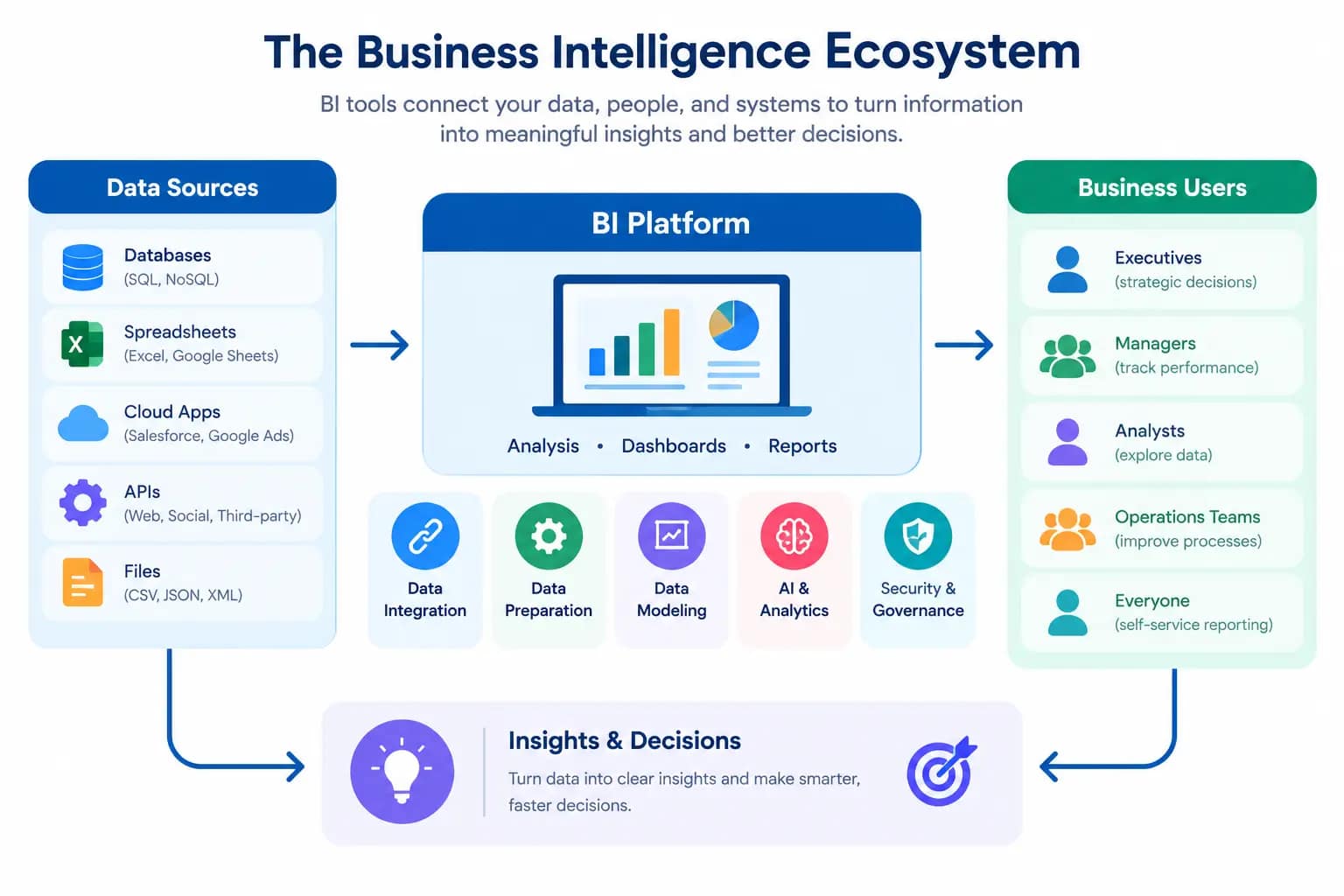
The data may come from many different places, including:
- CRM systems
- SQL databases
- spreadsheets
- financial applications
- e-commerce platforms
- marketing platforms
- APIs
- cloud data warehouses
- operational business applications
Instead of examining each source separately, a BI platform can bring relevant information together and provide a common environment for analysis.
For example, an e-commerce company might combine order data from its store, customer information from its CRM, advertising data from marketing platforms, and financial information from accounting software.
The resulting analysis could show:
- revenue by product
- conversion rate by marketing channel
- average order value
- customer retention
- product performance
- inventory levels
- advertising return on investment
The important distinction is that the software is not valuable simply because it creates charts.
Its real purpose is to help transform raw business data into information that people can understand and act on.
How BI Tools Turn Data Into Insights
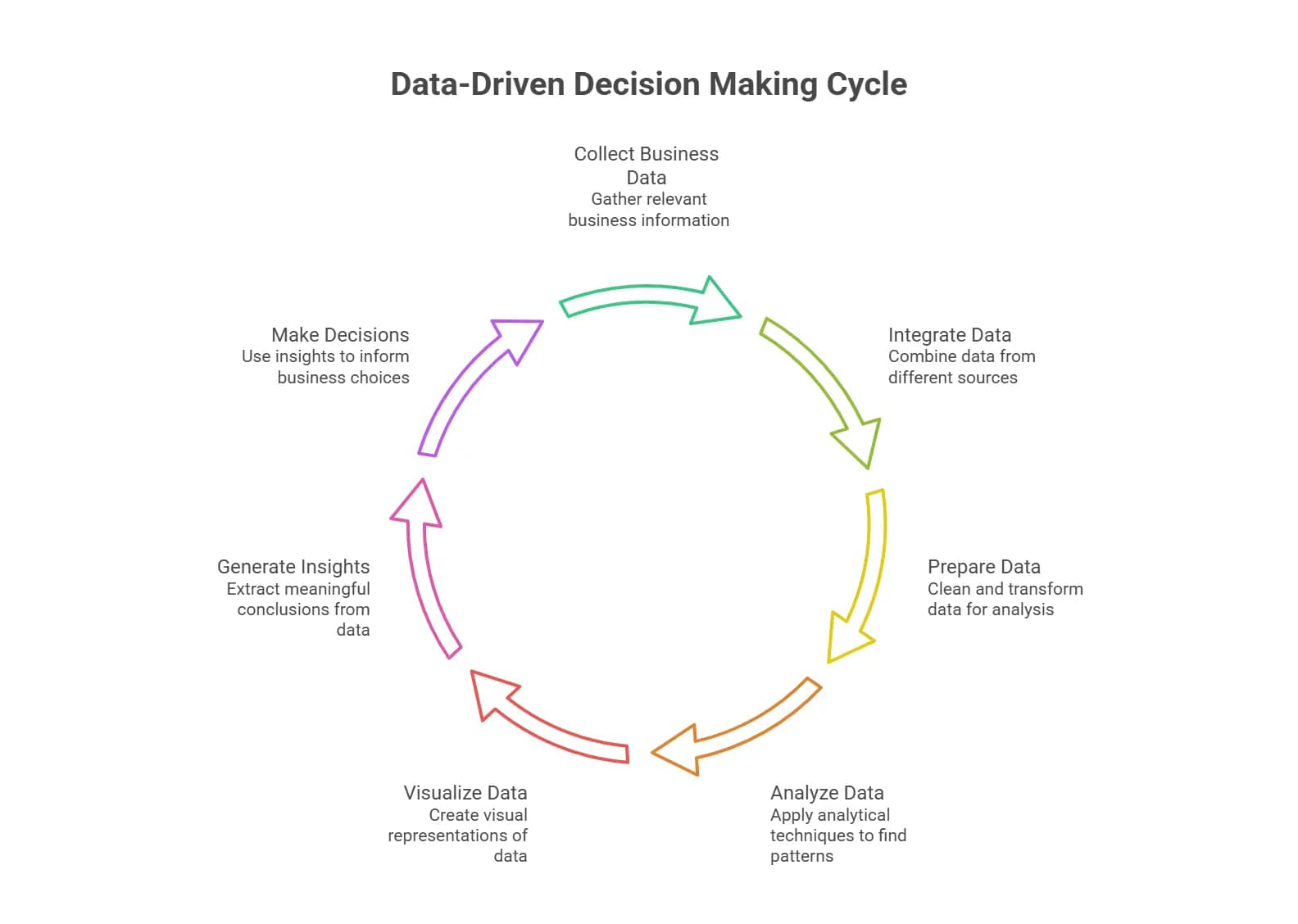
A typical analytical workflow looks like this:
Data sources → integration → preparation → modeling → analysis → visualization → insight → decision
Each stage has a different purpose.
Data sources provide the underlying information.
Data integration connects information from multiple systems.
Data preparation cleans and transforms the information.
Data modeling establishes relationships between tables, dimensions, measures, and business metrics.
Data analysis allows users to investigate patterns and performance.
Data visualization presents the results through charts, tables, maps, and other visual elements.
Dashboards and reports make those results accessible to business users.
Finally, data insights help decision-makers determine what action to take.
This relationship is important because a dashboard without reliable underlying data can create a false sense of confidence. The quality of the decision depends partly on the quality, consistency, and context of the information behind it.
Business Intelligence vs. Business Analytics
The terms BI and business analytics overlap, but they are not always used in exactly the same way.
Business intelligence traditionally focuses heavily on understanding current and historical performance through reporting, dashboards, KPIs, and data visualization.
Business analytics is a broader analytical concept that can include:
- descriptive analytics
- diagnostic analytics
- predictive analytics
- forecasting
- statistical analysis
- optimization
- advanced modeling
For example, a dashboard showing last month’s revenue is primarily descriptive.
Investigating why revenue declined is diagnostic.
Estimating next quarter’s revenue is predictive.
The boundaries between these categories are increasingly blurred as modern analytics platforms add machine learning, natural-language queries, automated insights, and predictive capabilities.
How Do Business Intelligence Tools Work?
Although platforms differ considerably in architecture and complexity, the basic workflow is surprisingly consistent.
Connect and Collect Data
The first step is connecting analytical software to relevant data sources.
Common sources include:
- CRM platforms
- relational databases
- SQL databases
- Microsoft Excel
- CSV files
- APIs
- cloud applications
- data warehouses
- e-commerce systems
- financial software
- marketing platforms
A mature data environment may contain dozens or hundreds of sources.
Connectors and APIs allow the analytical platform to retrieve information from those systems.
For example, a sales dashboard might combine:
CRM → sales pipeline
E-commerce platform → online orders
Financial system → revenue and costs
Marketing platform → campaign performance
The objective is to create a usable analytical view without requiring employees to manually copy information between systems.
Prepare and Transform Data
Raw data is rarely ready for analysis immediately.
It may contain:
- duplicate records
- missing values
- inconsistent naming
- different date formats
- incorrect categories
- incompatible data structures
Data preparation addresses these issues.
ETL and ELT processes are commonly used to move and transform information.
With ETL, data is:
Extracted → Transformed → Loaded
With ELT, data is:
Extracted → Loaded → Transformed
The choice depends on the organization’s architecture, data infrastructure, workloads, and analytical requirements.
Data cleaning improves data quality, while transformation converts information into a structure that can be analyzed consistently.
Analyze Business Data
Once data has been prepared, users can query and analyze it.
Analysis may involve:
- filtering
- grouping
- aggregation
- calculations
- comparisons
- trend analysis
- segmentation
- drill-down
- statistical analysis
- anomaly detection
- forecasting
A sales manager might compare revenue by region.
A marketing analyst might examine conversion rates by campaign.
A financial analyst might compare actual performance against a budget.
A business owner might examine monthly revenue, customer retention, and profit margins from one dashboard.
Create Reports and Dashboards
The results of analysis can then be presented through reports and dashboards.
A dashboard might contain:
- revenue
- sales
- profit
- conversion rate
- customer count
- retention rate
- inventory
- charts
- tables
- trend indicators
Interactive dashboards can also provide filters and drill-down capabilities.
For example, a company-wide revenue figure could be broken down by:
company → region → product category → product → transaction
This ability to move from a high-level KPI to the underlying detail is one of the reasons dashboards are useful for operational and strategic analysis.
Turn Insights Into Business Decisions
The final stage is often overlooked.
Analytics only creates business value when people use the information.
An insight might reveal that:
- a product category is losing sales
- a marketing campaign has unusually high acquisition costs
- customer churn has increased
- inventory is accumulating
- a region is outperforming others
- revenue is growing while margins are declining
The BI system provides the evidence.
The business decides what to do with it.
That distinction matters because analytics software does not automatically create good business decisions. Data quality, business context, user interpretation, and organizational processes still matter.
What Are Business Intelligence Tools Used For?
The same analytical platform can support many departments because business data exists throughout an organization.
Sales and Revenue Analysis
Sales teams can use BI dashboards to monitor:
- revenue
- sales pipeline
- conversion rates
- sales targets
- customer acquisition
- regional performance
- representative performance
A manager can compare current performance with previous periods and identify changes that deserve attention.
Marketing Analytics
Marketing teams can combine campaign, website, advertising, and customer data.
Useful metrics include:
- traffic
- leads
- conversions
- customer acquisition cost
- return on investment
- campaign revenue
- conversion rate
Connecting marketing data with actual sales data is particularly useful because it moves analysis beyond clicks and impressions toward commercial outcomes.
Customer Analytics
Customer analytics focuses on understanding customer behavior.
It can include:
- customer segmentation
- purchase history
- retention
- churn
- customer lifetime value
- repeat purchases
- customer satisfaction
For example, a business could compare retention rates across customer segments and identify groups with unusually high churn.
Financial Analysis
Finance teams can use analytical platforms for:
- revenue analysis
- expense analysis
- profitability
- margins
- financial reporting
- budgeting
- forecasting
- variance analysis
A financial dashboard can bring information from accounting systems, sales platforms, and operational databases into a shared reporting environment.
Operational Analytics
Operational analytics focuses on how efficiently a business is running.
Examples include:
- productivity
- process performance
- inventory
- supply chain activity
- service levels
- operational costs
- resource utilization
This type of analysis is useful when management needs visibility into day-to-day operations rather than only financial results.
E-commerce Analytics
Online businesses can combine:
orders + customers + products + marketing + website activity + inventory
This makes it possible to analyze:
- online sales
- product performance
- average order value
- conversion rate
- customer behavior
- purchase history
- inventory
- marketing performance
For an e-commerce business, the ability to connect these datasets can be more valuable than any individual visualization feature.
Benefits of Business Intelligence Software
The benefits depend on how well the platform fits the organization’s data and workflows.
Make Data-Driven Decisions
Instead of relying entirely on spreadsheets or assumptions, teams can use current and historical information to support decisions.
Identify Trends and Opportunities
Visualizations and analytical models can make changes easier to recognize.
Examples include:
- growing product demand
- declining customer retention
- changing regional performance
- emerging revenue opportunities
Monitor KPIs and Business Performance
Dashboards provide a centralized view of important metrics.
A KPI might measure:
- revenue
- profit
- sales
- conversion rate
- churn
- customer retention
- inventory turnover
- customer acquisition cost
The value comes from defining meaningful metrics and making their context clear.
Automate Reporting
Automated data refreshes and scheduled reports can reduce repetitive manual reporting work.
Instead of rebuilding the same spreadsheet every week, teams can maintain a connected report or dashboard.
Improve Data Accessibility
Self-service analytics allows more employees to explore approved information without requiring every question to pass through a specialized data team.
Reduce Manual Data Analysis
Automation can reduce repetitive tasks such as:
- copying data
- combining spreadsheets
- rebuilding charts
- calculating recurring metrics
- distributing recurring reports
This can give analysts more time for interpretation and higher-value work.
Types of Business Intelligence Tools
Not every platform is designed for the same type of organization or user.

Self-Service BI Tools
Self-service platforms are designed to let business users perform analysis without depending entirely on IT or data specialists.
They generally emphasize:
- ease of use
- interactive dashboards
- visual analysis
- reusable reports
- accessible data exploration
They can be particularly useful for organizations where business analysts and managers need direct access to trusted data.
Data Visualization and Dashboard Tools
These platforms focus strongly on turning datasets into visual reports and interactive dashboards.
They are useful when users need to explore:
- trends
- comparisons
- KPIs
- geographic patterns
- category performance
Enterprise BI Tools
Enterprise platforms typically place greater emphasis on:
- governance
- security
- centralized administration
- scalability
- complex data environments
- large user populations
They may require more implementation and administration than simpler self-service products.
Embedded BI Tools
Embedded BI places analytics directly inside another application.
For example, a SaaS company might give customers access to dashboards without sending them to a separate analytics product.
Important capabilities can include:
- embedded dashboards
- analytics APIs
- white-label analytics
- customer-facing reports
- application integration
- multi-tenant support
This makes embedded analytics particularly relevant to software companies.
AI-Powered BI Tools
AI is increasingly being integrated into analytics platforms.
Capabilities can include:
- natural-language questions
- automated insights
- anomaly detection
- forecasting
- AI-generated summaries
- text-to-SQL
- conversational analytics
- AI assistants
- AI agents
However, AI features should be evaluated alongside the underlying data architecture. An intelligent interface works best when the underlying data is accurate,consistent, and well managed.
Best Business Intelligence Tools
There is no universal winner because different platforms target different combinations of users, data environments, deployment models, and analytical requirements.
The following platforms are useful to evaluate as part of a broader comparison.
Microsoft Power BI
Power BI is closely associated with the Microsoft ecosystem and is widely used for reporting, dashboards, data modeling, and business analytics.
It can be relevant for organizations already using Microsoft products and services.
Important evaluation areas include:
- data connectivity
- data modeling
- visualization
- dashboards
- reporting
- governance
- Microsoft ecosystem integration
- user licensing
Tableau
Tableau is strongly associated with interactive data visualization and visual analytics.
It is useful for organizations where exploratory analysis and rich visualization are important.
Consider:
- visualization capabilities
- dashboard flexibility
- data connections
- analytical workflows
- governance
- user skill requirements
Qlik Cloud Analytics
Qlik provides analytics and data integration capabilities through its cloud platform.
Its approach is relevant for organizations that need to combine data from multiple sources and explore relationships within business information.
Consider:
- data integration
- associative analysis
- dashboards
- governance
- scalability
- cloud architecture
Google Looker
Looker is an analytics platform associated with the Google Cloud ecosystem.
Its architecture places considerable importance on data modeling and governed metrics.
It can be relevant when an organization needs consistent definitions for business metrics across users and reports.
Consider:
- semantic modeling
- governed metrics
- dashboards
- data warehouse integration
- embedded analytics
- developer workflows
Zoho Analytics
Zoho Analytics is positioned around self-service business analytics and reporting.
It may appeal to organizations looking for dashboards and reporting across multiple business applications.
Consider:
- ease of use
- data connectors
- reporting
- dashboards
- automation
- integration with business applications
Sisense
Sisense combines BI with embedded analytics capabilities.
Its embedded orientation can make it relevant to software companies that want analytics to become part of their own applications.
Consider:
- embedded analytics
- application integration
- dashboards
- APIs
- data connectivity
- developer requirements
ThoughtSpot
ThoughtSpot focuses heavily on search-driven and AI-assisted analytics.
Natural-language interaction is an important part of its positioning.
When evaluating it, look at:
- natural-language analytics
- search
- AI-assisted insights
- data modeling
- data connectivity
- governance
SAP Analytics Cloud
SAP Analytics Cloud combines analytics and planning capabilities within the SAP ecosystem.
It can be relevant to organizations already operating substantial SAP environments.
Consider:
- SAP integration
- planning
- reporting
- analytics
- enterprise governance
- data connectivity
Oracle Analytics Cloud
Oracle’s cloud analytics platform supports data visualization and analytical workloads within the Oracle ecosystem.
Evaluation areas include:
- Oracle data integration
- visualization
- reporting
- analytics
- cloud deployment
- enterprise requirements
IBM Cognos Analytics
IBM Cognos Analytics provides reporting, dashboards, and analytical capabilities for organizations with structured enterprise reporting requirements.
Consider:
- reporting
- dashboards
- governance
- enterprise deployment
- data connectivity
- AI-assisted analytics
Yellowfin BI
Yellowfin focuses on BI, dashboards, reporting, and data storytelling.
Its capabilities can be evaluated around:
- dashboard creation
- reporting
- data visualization
- storytelling
- collaboration
- data integration
SAS Visual Analytics
SAS Visual Analytics combines visualization with broader analytical capabilities.
It can be relevant for organizations that require advanced analytics alongside reporting and visualization.
Consider:
- statistical analytics
- visualization
- predictive capabilities
- data preparation
- enterprise analytics
Strategy
Strategy provides enterprise analytics and BI capabilities for reporting, dashboards, and large-scale analytical environments.
When evaluating the platform, consider:
- enterprise reporting
- dashboards
- scalability
- governance
- data integration
- deployment requirements
Sigma Computing
Sigma takes a spreadsheet-like approach to cloud data analysis.
This can be useful for users who are comfortable with spreadsheet-style workflows but need to work directly with modern cloud data environments.
Consider:
- cloud data warehouse connectivity
- spreadsheet-style analysis
- collaboration
- dashboards
- data exploration
- business-user accessibility
Key Features to Look for in a BI Platform
The right feature set depends on your organization, but these areas deserve attention.
Data Integration and Connectors
Look at which systems the platform can connect to.
Potential sources include:
- SQL databases
- CRM systems
- spreadsheets
- APIs
- data warehouses
- cloud applications
- e-commerce platforms
Integration should be evaluated based on your actual data environment rather than the number of connectors listed on a vendor’s website.
Data Visualization
Look for visualization options that help users understand the information they actually need.
Common options include:
- bar charts
- line charts
- tables
- maps
- KPI cards
- scatter plots
- interactive visualizations
The goal is not to have the largest chart library. It is to make important patterns understandable.
Dashboards and Reporting
Check whether users can create:
- interactive dashboards
- scheduled reports
- executive summaries
- operational reports
- drill-down views
- filtered reports
Also consider how easily dashboards can be shared and maintained.
Data Modeling and Analytics
A platform should support the way your organization structures information.
Important concepts include:
- dimensions
- measures
- relationships
- calculated fields
- metrics
- semantic models
A strong data model can prevent different departments from calculating the same KPI differently.
AI and Natural-Language Queries
AI capabilities can make analytics more accessible.
Useful functionality may include:
- natural-language questions
- automated insights
- anomaly detection
- forecasting
- AI-generated explanations
- text-to-SQL
But evaluate the accuracy and transparency of these features rather than judging them solely by whether the vendor calls them “AI-powered.”
Data Security and Governance
Security becomes increasingly important as more business data enters analytical systems.
Consider:
- authentication
- authorization
- role-based access control
- data permissions
- encryption
- audit logs
- data lineage
- governance controls
Governance also helps ensure that employees are using consistent and trusted definitions for important metrics.
Collaboration and Sharing
Users should be able to distribute information in ways that match their workflow.
Depending on the platform, this might include:
- dashboard sharing
- scheduled reports
- comments
- alerts
- collaboration
- controlled external access
Scalability
A platform that works for 20 users may not behave the same way with 2,000 users and significantly larger datasets.
Consider:
- data volume
- number of users
- query workloads
- dashboard complexity
- refresh frequency
- administrative requirements
How to Choose the Right BI Tool
The right choice depends more on your actual environment than on a generic feature checklist.

Define Your Business Goals
Start with the problem.
Do you need:
- executive dashboards?
- financial reporting?
- sales analytics?
- marketing attribution?
- customer analytics?
- operational reporting?
- e-commerce analysis?
- embedded analytics?
A clear use case makes the rest of the evaluation easier.
Consider Your Data Sources
List the systems that contain information you need to analyze.
For example:
CRM + SQL database + Excel + e-commerce platform + marketing platform
Then check whether candidate platforms can connect to those sources reliably.
Check Integrations
A technically capable platform is easier to use when it connects smoothly with your important systems.
Check:
- native connectors
- APIs
- database connectivity
- data warehouse support
- scheduled refreshes
- integration limitations
Consider Ease of Use
Identify who will actually use the platform.
A data analyst may be comfortable with SQL and complex data modeling.
A business manager may prefer drag-and-drop analysis and ready-made dashboards.
The best interface depends on the audience.
Evaluate AI Capabilities
Do not evaluate AI as a separate marketing feature.
Ask how it interacts with the underlying data.
Can users ask questions naturally?
Can the system explain results?
Can it identify anomalies?
Can it generate useful summaries?
Can it perform forecasting?
Most importantly, are the results based on trusted and governed data?
Compare Pricing and Total Cost
The license is only part of the cost.
Total cost of ownership can include:
Licensing + implementation + data integration + training + administration + maintenance
A cheaper license may not produce a cheaper deployment if implementation and administration are substantially more demanding.
Check Security and Compliance
Consider the sensitivity of your data.
Financial information, customer records, employee information, and other sensitive datasets may require stronger controls.
Review:
- access management
- permissions
- authentication
- auditing
- encryption
- governance
- compliance requirements
Consider Scalability
Think beyond your current team.
Consider how the platform will handle:
- more users
- more data
- additional departments
- additional dashboards
- new data sources
- higher reporting frequency
Business Intelligence Tools for Small Businesses
Small businesses usually have different requirements from large enterprises.
A smaller company may work with a small data or IT team rather than dedicated BI specialists.
In that environment, ease of use can be more important than a huge collection of enterprise features.
A practical small-business setup might involve:
CRM + accounting software + spreadsheets + e-commerce platform → BI platform → dashboard
Useful capabilities include:
- simple data connectors
- easy dashboard creation
- automated reporting
- basic data modeling
- understandable pricing
- minimal administration
- accessible visualization
Small businesses should also consider the total amount of work required to maintain the system.
A platform that requires advanced technical skills may also require more time and resources for setup and ongoing management.
Business Intelligence Tools for E-commerce

E-commerce creates large amounts of connected data.
A useful analytics environment may combine:
website activity + orders + customers + products + marketing + inventory
Sales and Revenue Tracking
Track:
- revenue
- orders
- average order value
- sales by product
- sales by channel
- sales trends
Customer and Purchase Analysis
Connect customer records with purchase history to understand:
- repeat purchases
- customer lifetime value
- customer segments
- retention
- churn
- purchasing behavior
Marketing and Conversion Analytics
Connect advertising and marketing data with actual commercial outcomes.
This allows teams to examine:
campaign → traffic → product view → cart → checkout → purchase → revenue
That is more useful than looking at advertising metrics in isolation.
Product Performance
Product-level analysis can reveal:
- best-selling products
- underperforming products
- product revenue
- conversion rates
- margins
- category trends
Inventory and Operations
Inventory analytics can help monitor:
- stock levels
- product demand
- inventory turnover
- stockouts
- excess inventory
For growing online stores, connecting inventory information with sales trends can support better operational planning.
AI and the Future of Business Intelligence
AI is changing how people interact with analytical systems, but the underlying data architecture remains important.
Natural-Language Data Analysis
Instead of building every query manually, users can ask questions such as:
“Which product category generated the most revenue last quarter?”
The system can interpret the question, query relevant data, and present the result.
AI-Generated Insights and Reports
Generative AI can help summarize analytical results.
For example, it may identify that:
- revenue increased
- one region declined
- a product category changed significantly
- customer churn exceeded a previous period
The useful part is not the generated wording itself. The value comes from connecting those observations to reliable underlying data.
Predictive and Augmented Analytics
Machine learning can support:
- forecasting
- demand prediction
- anomaly detection
- customer churn analysis
- risk modeling
- predictive maintenance
Augmented analytics goes further by using AI and machine learning to automate parts of the analytical process.
AI Agents and Agentic BI
The next stage is moving beyond question-and-answer interfaces toward systems that can perform multi-step analytical tasks.
An AI agent could potentially:
- retrieve data
- analyze performance
- identify an anomaly
- investigate possible causes
- generate a report
- notify the relevant team
The practical value of these systems will depend on data access, governance, permissions, accuracy, and how much human oversight is required.
What BI Software Actually Costs
The advertised subscription price is only one part of the financial picture.
A realistic evaluation should consider:
Software license + implementation + integration + training + administration + maintenance
Licensing
Common pricing structures include:
- per-user pricing
- role-based licensing
- capacity-based pricing
- usage-based pricing
- subscription plans
- enterprise agreements
The pricing model matters because a platform that is inexpensive for a small team may have a very different cost structure at enterprise scale.
Implementation
Implementation can involve:
- connecting data sources
- building data models
- designing dashboards
- configuring permissions
- migrating reports
- training users
Training and Adoption
A technically powerful platform provides limited value if users do not understand how to use it.
Training requirements depend on:
- user skill
- platform complexity
- data complexity
- number of users
- reporting requirements
Administration
Enterprise environments may require ongoing work around:
- user management
- security
- governance
- data quality
- dashboard maintenance
- data refreshes
- system monitoring
These costs should be considered when comparing platforms.
What Happens If You Switch BI Platforms Later?
Switching systems is possible, but it may involve more than exporting dashboards.
A migration may involve :
- moving reports,
- dashboards,
- data models,
- calculated fields,
- business metrics,
- permissions,
- integrations,
- and documentation.
Vendor flexibility can also become an important consideration when business logic relies heavily on proprietary features.
This is why portability and open data architecture can matter during the initial selection process.
A well-designed architecture can separate core business data and transformation logic from the presentation layer where possible.
Frequently Asked Questions
What is a business intelligence tool?
It is software that helps organizations connect, prepare, analyze, visualize, and report on business data. The resulting dashboards, reports, and insights can support operational and strategic decisions.
What are BI tools used for?
Common uses include sales analysis, marketing analytics, financial reporting, customer analytics, operational monitoring, KPI tracking, forecasting, and e-commerce analysis.
What are the most popular BI platforms?
Commonly evaluated platforms include Microsoft Power BI, Tableau, Qlik, Google Looker, Zoho Analytics, Sisense, ThoughtSpot, Domo, SAP Analytics Cloud, Oracle Analytics Cloud, IBM Cognos Analytics, SAS Visual Analytics, Strategy, Yellowfin BI, and Sigma Computing.
Popularity alone should not determine selection. The appropriate platform depends on data sources, users, analytical requirements, security needs, deployment model, and budget.
Is Power BI a business intelligence tool?
Yes. Microsoft Power BI is a BI and analytics platform used for data modeling, visualization, reporting, dashboards, and business analysis.
What is the difference between BI and business analytics?
BI traditionally emphasizes reporting, dashboards, visualization, and understanding current or historical performance. Business analytics can include these areas while also extending into predictive analytics, statistical analysis, forecasting, and other advanced methods.
Are BI platforms suitable for small businesses?
Yes, but the requirements can differ significantly from those of large enterprises.
A small business may prioritize ease of use, straightforward integrations, automated reporting, manageable costs, and minimal administration.
Can BI platforms be used for e-commerce?
Yes. E-commerce analytics can combine orders, customers, products, marketing, website activity, revenue, and inventory information.
This can help businesses understand conversion, customer behavior, product performance, sales trends, and inventory.
How does AI improve business intelligence?
AI can make analytical systems easier to interact with and automate certain tasks.
Examples include natural-language queries, automated insights, anomaly detection, forecasting, AI-generated summaries, and conversational analytics.
The quality of these features still depends on the quality and accessibility of the underlying data.
How much does BI software cost?
There is no single price because vendors use different licensing and pricing models.
Costs may depend on:
- number of users
- user roles
- data capacity
- usage
- deployment
- advanced features
- enterprise requirements
Organizations should also consider implementation, integration, training, and administration when calculating total cost of ownership.
Where to Go From Here
Choosing an analytics platform becomes much easier when you stop comparing feature lists in isolation.
Start with the data.
Identify where your business information currently lives, how that information needs to be combined, who needs access to it, and which decisions the resulting analysis should support.
Then work through the chain:
Data sources → integration → preparation → modeling → analysis → visualization → dashboards → insights → decisions
From there, evaluate platforms according to your actual requirements:
- data connectors
- data modeling
- visualization
- reporting
- AI capabilities
- security
- governance
- scalability
- ease of use
- deployment
- pricing
- total cost of ownership
The goal is not to find the platform with the longest feature list.
The goal is to find an analytical environment that your people can use, your data can support, and your organization can maintain as it grows.