Compare the Google QR code generator in Chrome with free and AI-powered tools. See features, limits and which one suits you best in 2026.
You’ve built a Google Form for tomorrow’s class, a PDF menu for your café, or a sign-up sheet for Saturday’s event. Now you need a scannable code, and you need it in the next two minutes. Which Google QR code generator should you use: Chrome, a free tool, or one of the new AI-powered options?
The confusing part is that “Google QR code generator” doesn’t mean one thing. People use it for three different jobs: the QR feature built into Chrome, making a QR code for a Google product like Forms, Drive or Classroom, and using any online tool that works with Google links. This guide covers all three Google QR code generator options, compares them honestly, and helps you pick the right one for your situation.
Quick answer: For a fast, one-off link, use the Google QR code generator in Chrome. Use a free generator when you need your logo, colors or a print-ready file. Use an AI-powered tool when you’re running campaigns, need scan tracking, or want polished designs at scale.

1-A Google QR Code Generator
A Google QR code generator is a tool that turns a web link into a scannable square. Google’s own version lives inside the Chrome browser and creates a code for whatever page you’re viewing. Everything else, including codes for Google Forms, Drive files and Classroom, is made with Google’s links plus a separate generator.
1.1-Chrome’s Built-In Google QR Code Generator
Chrome’s Google QR code generator can make a code for any page you have open, with no extra software.
- Open the page you want to share.
- Click the Share icon on the right side of the address bar (or right-click the page and look for the QR option).
- Choose Create QR Code.
- Click Download to save the image.
This Google QR code generator works on desktop and on mobile Chrome. The catch is that it’s deliberately basic: URLs only, no logo, no custom colors, no scan data. Think of it as a photocopier, not a design studio.

1.2-Scanning with the Google App and Google Lens
A quick clarification, because it trips people up: Chrome creates codes, while the Google app and Google Lens scan them. In the Google app, tap the camera icon in the search bar, point at the code, and tap the result. Most modern phone cameras scan QR codes natively too, so your audience usually doesn’t need a separate app.
1.3-Creating QR Codes for Google Forms, Drive, Classroom and Meet
Google Classroom has no built-in QR generator. The workflow is the same for every Google product: copy the link, paste it into a Google QR code generator (Chrome’s or a dedicated tool), download the code.
Where to find each link:
- Classroom invite: Class Settings → Invite link
- Google Form: Send → link icon → copy the responder link
- Drive file or folder: Right-click → Share → Copy link
- Meet: Copy the meeting link from the invite
The most common failure here isn’t the QR code at all. It’s sharing permissions. If a Drive PDF is set to “Restricted,” everyone who scans it sees an access-denied page, and it looks like the code is broken. Set files to Anyone with the link can view before you print anything. Classroom links are different: students must already be enrolled, and personal Google accounts won’t work if your school restricts access to school accounts.

2-Free QR Code Generators: What You Get (and What You Don’t)
A good free QR code generator covers most everyday needs. If you’re sharing a Wi-Fi password, a PDF, or a permanent website link, you may never need to pay.
2.1-What “Free” Usually Includes
- Unlimited static codes for URLs, text, Wi-Fi details and contact cards (vCards)
- Basic color and size controls
- PNG and SVG downloads
- Often a small number of dynamic codes on a free plan
Chrome’s Google QR code generator, Canva’s QR app and several dedicated generators fall into this group. If you want to create a QR code free with a logo or brand colors, a dedicated generator is the step up from Chrome, and we’ll walk through it below.

2.2-Hidden Limits of Free Tools
Read the small print before you print 500 flyers with any Google QR code generator or third-party tool.
- Static codes can’t be edited. If the link changes, every printed code is useless.
- No analytics. You can’t tell whether anyone scanned.
- Some tools add watermarks, cap downloads or ask you to sign up before you can save the file.
- Free dynamic codes can stop working if a trial ends or a plan lapses. Check the expiry terms first. A code on a printed banner that quietly dies in 14 days is a costly lesson.
2.3-Need to Generate a Barcode Instead
Many people searching for QR tools actually need a barcode, so here’s the difference. A QR code is two-dimensional and holds links, text or contact data. A traditional barcode (like the stripes on a product) is one-dimensional and typically holds a short number, such as a product or inventory code. Scanners at retail checkouts expect barcodes, not QR codes.
If you need to generate a barcode for products or stock, use a tool that lists the exact format you need (UPC, EAN, Code 128). Chrome can’t do this. Several free QR generators include a barcode option, but check the format list before you commit, and never print retail barcodes without confirming your numbers are valid.
2.4-Free Tools Are Best For
A Google QR code generator or free tool works well for teachers sharing class notes, students running a project, anyone with a one-time event, and small businesses with permanent links such as a website or Wi-Fi code.

3-AI-Powered Tools vs a Google QR Code Generator: What’s Real and What’s Marketing
“AI-powered” is a label, not a standard. Some tools genuinely use AI; others just rebranded their color picker. Here’s how to tell the difference.
3.1-What “AI-Powered” Actually Means
You’ll run into three types:
- Smart design assistance. The tool suggests colors, logo placement or layouts based on your brand. Useful and low-risk.
- AI-art QR codes. The code is blended into a generated image, like a landscape or a product shot. Eye-catching, but the riskiest option for scanning.
- Smart routing and analytics. A dynamic code sends people to different pages by device, location or time, and reports what happened.
Types 1 and 3 add real value. Type 2 is mostly about looks.
3.2-Benefits of AI QR Generators
- Polished designs without a designer. Helpful if you don’t have brand guidelines or time.
- Brand consistency across posters, packaging and social posts.
- Scan insights. Dynamic codes typically report total scans, unique scans, device type and location, so you can see which poster or placement works.
- Bulk creation for campaigns with dozens of unique codes.
3.3-Risks and Downsides
- Artistic codes can fail to scan. Heavy image blending lowers contrast. Always test on both an iPhone and an Android phone.
- Platform dependence. With dynamic codes, your printed code redirects through the provider. If you stop paying or they shut down, it breaks.
- Privacy. Ask what scan data the provider collects and how long it keeps it.
- Over-design hurts trust. Public QR codes have been used in scams: the FBI warned in 2022 that criminals tamper with public codes to send people to phishing pages. People now hesitate before scanning anything that looks strange.

3.4-AI Tools Are Best For
Marketers, restaurants, event organizers, retail shops and creators who care about results. If you’d ask “which poster got more scans?”, you want analytics, and that usually means a dynamic or AI-assisted platform.
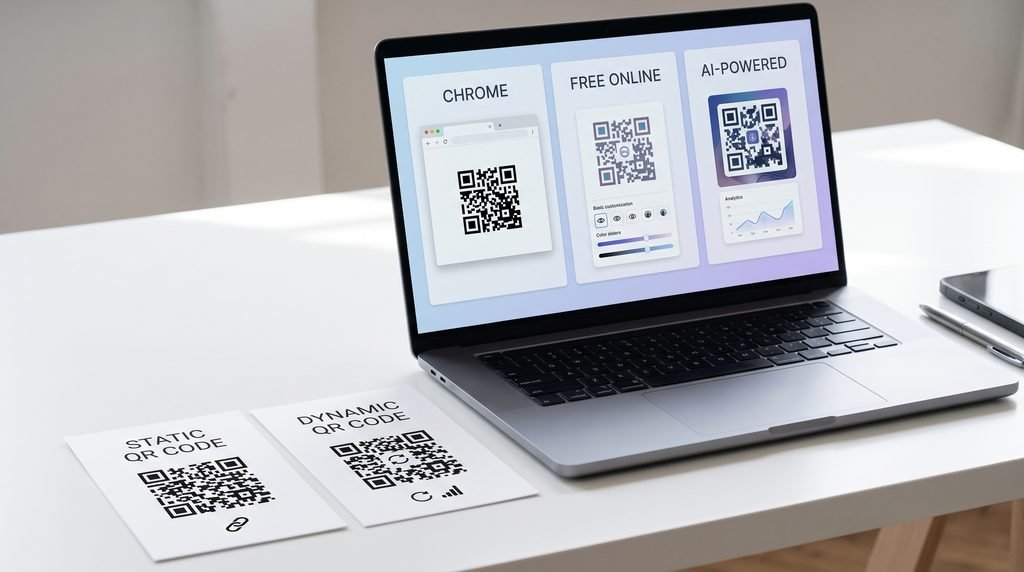
4-Google QR Code Generator vs Free vs AI-Powered Tools: Side-by-Side Comparison
| Chrome (Google) | Free Online Generator | AI-Powered Generator | |
|---|---|---|---|
| Cost | Free | Free (some paid upgrades) | Free tier, then paid plans |
| Ease of use | Easiest | Easy | Easy to moderate |
| Code types | URLs only | URL, text, Wi-Fi, vCard, more | Wide range, often including Google Forms and PDFs |
| Logo, colors, frames | No | Yes | Yes, plus design suggestions |
| Static or dynamic | Static | Mostly static, some dynamic | Mostly dynamic |
| Scan analytics | No | Rare | Usually yes |
| Editable after printing | No | Only with dynamic codes | Yes (dynamic codes) |
| Best for | Quick one-off links | Print-ready, permanent content | Campaigns and tracking |
| Main drawback | No customization | Limits on editing and tracking | Ongoing cost, platform dependence |
Pricing and plan limits change often, so check each tool’s own site before you commit.
4.1-Static vs Dynamic: The Decision That Matters Most
This choice affects you more than any design feature, and the Google QR code generator in Chrome only makes static codes.
| Static | Dynamic | |
|---|---|---|
| Destination editable | No | Yes |
| Scan tracking | No | Yes |
| Expires | Never (the link itself might) | Needs an active plan |
| Best for | Permanent content | Content that changes |
Rule of thumb: if the link will never change, go static. If you might update it, or you want to know who’s scanning, go dynamic. A teacher printing a worksheet that links to a permanent resource is fine with static. A teacher reusing the same bulletin-board code every semester and swapping the assignment behind it should use dynamic.
5-Create a QR Code in 3 Ways (Step-by-Step)
5.1-Method 1: Using Chrome’s Google QR Code Generator (Under 1 Minute)
- Open the page or Google link in Chrome.
- Click the Share icon in the address bar.
- Select Create QR Code.
- Download the image and test-scan it.
5.2-Method 2: Using a Free Online Generator
This is the simplest way to create a QR code free with your own branding.
- Choose the code type (URL for Google Forms or Drive links).
- Paste your link.
- Add your logo and colors. Keep dark dots on a light background.
- Test it on two phones.
- Download as PNG for screens or SVG for print.
5.3-Method 3: Using an AI-Powered Generator
- Choose the type and enter your destination (ideally as a dynamic code).
- Let the AI suggest a design, then simplify it if it looks busy.
- Add a frame with a call to action, such as “Scan to view the menu.”
- Test at the actual printed size.
- Download, and save your dashboard login so you can change the destination later.

6-Which Tool Should You Choose? A Quick Decision Guide
6.1-Choose Chrome’s Google QR Code Generator If…
You need one code for one link, and appearance doesn’t matter. Example: you want colleagues to scan a shared Google Doc in a meeting.
6.2-Choose a Free Generator If…
You need your logo, brand colors and a print-ready file for something permanent. Example: a Wi-Fi code on a café wall, or a code linking to your website on business cards.
6.3-Choose an AI-Powered Tool If…
You run campaigns, need editable destinations, or want to compare results across placements. Example: a restaurant testing two different table-tent designs to see which gets more scans.
6.4-Quick Checklist
Ask yourself:
- Will the link ever change?
- Do I need to know how many people scan it?
- Will it be printed, and how large?
- How much does design matter?
- What’s my budget over the next 12 months?
Two “yes” answers to the first two questions point you toward dynamic.

7-Google QR Code Generator Best Practices for Better Scans (Whichever Tool You Use)
- Use strong contrast. Dark code on a light background is the most reliable. Inverted (light-on-dark) codes can fail on older scanners.
- Print at least 2 cm × 2 cm (about 0.8 inches) for close-range scanning. For distance, use roughly a 10:1 rule: a code scanned from 10 feet should be about 1 foot wide.
- Keep the quiet zone. The blank margin around the code helps scanners find its edges. Don’t crop it.
- Keep logos small. QR codes include error correction that can recover up to 30% of damaged data at the highest level, but a big logo eats into that buffer. A logo well under a third of the code area is safer, and around 15% is a comfortable target.
- Add a call to action. A code with context outperforms a bare one. Dyson puts “Scan for your exclusive benefits” and a short list of what you’ll get on a card inside the box of new machines. Philz Coffee puts “Scan to order and pick up at the bar” on stickers at its tables. Ocean Spray prints “Scan for our best recipes” on its cranberry sauce cans. Each one names the payoff and sits where the decision happens.
- Use HTTPS links.
- Test before printing, on both iPhone and Android, at the real print size.
7.1-Staying Safe: Avoiding QR Code Scams (“Quishing”)
QR phishing, sometimes called “quishing,” is real. Before scanning a public code, check whether a sticker has been placed over the original. After scanning, preview the URL and make sure it matches what you expected. Don’t enter passwords or payment details on a page that looks off. If you display codes in public, inspect them regularly and use a link on a domain you control.

8-Common Mistakes to Avoid
- Using a static code for content that changes. The classic version: a code printed on 200 handouts pointing to a form that later gets replaced.
- Skipping the test scan. Wrong links and permission errors are cheap to fix before printing and expensive after.
- Forgetting Google sharing permissions. A restricted file looks like a broken code.
- Choosing a flashy AI design that won’t scan. If a code looks like a painting, test it twice.
- Printing too small or in low resolution. Pixelated JPEGs fail often. Use PNG at 300 DPI or SVG.
- Forgetting Chromebook users. Chromebooks running ChromeOS 89 or later can scan via the Camera app (Scan → QR Code), but older devices can’t. Include a clickable link as backup in digital documents.
Final Verdict
The Google QR code generator in Chrome is the fastest option for a quick link. A free generator gives you branding and print-ready files without cost. An AI-powered tool earns its price when you need tracking, editable destinations or designs at scale. Whichever you choose, test the code on two phones before it goes anywhere public.
Start with the smallest tool that does the job, even if that’s just Chrome’s Google QR code generator. If you outgrow it, switching is easy, and now you know exactly what to look for.

Frequently Asked Questions
1- Is there a Google QR code generator?
Yes. Chrome has a built-in Google QR code generator: click Share in the address bar, then Create QR Code. It makes basic codes for web pages, with no customization or tracking. For Forms, Drive or Classroom links, paste the link into a Chrome-generated code or a dedicated generator.
2- How do I use the Google QR code generator in Chrome?
Open the page, click the Share icon in the address bar, select Create QR Code, and download the image. It takes under a minute. Test-scan it with your phone before printing or sharing.
3-Is the Google QR code generator free?
Yes. Chrome’s Google QR code generator costs nothing and has no sign-up. If you want logos, colors, frames or analytics, you’ll need a separate tool, and some of those features may require a paid plan.
4-Are AI QR code generators better than free ones?
Not automatically. AI tools offer design help, tracking and bulk creation, which suit marketing campaigns. For permanent links, a free generator does the job. Better means “better for your goal,” not “more advanced.”
5-Do free QR codes expire?
Static codes never expire, though the link they point to can break if a file is deleted or a class is archived. Dynamic codes can stop working if your plan or trial ends, so check each provider’s terms.

Pingback: Best QR Barcode Generator: 4 Free Wi-Fi, vCard & SMS Codes -
Pingback: Create QR Code Free in 2026: Never Expires, Free Scan Tracking & AI Tools (Complete Guide) -